All the prices are affected due to rapid change in exchange rates. Please re-confirm the prices while placing order. Thank you. Call – WhatsApp: 03 111 611 199 or email us: info@aforapple.pk.
₨588,999.00Original price was: ₨588,999.00.₨586,999.00Current price is: ₨586,999.00.
Overview
Up to3.7xfaster CPU
performance1
Up to13xfaster
graphics
performance2
Up to11xfaster
machine
learning3
Up to21hours
battery life4
Scary fast.
Up to 10-core CPU
Up to 16-core GPU
Up to 32GB of unified memory
Up to 200GB/s memory bandwidth
Scary faster.
10-core CPU
Up to 32-core GPU
Up to 64GB of unified memory
Up to 400GB/s memory bandwidth
M1 Pro and M1 Max scale the amazing M1 architecture to new heights — and for the first time, they bring a system on a chip (SoC) architecture to a pro notebook. Both have more CPU cores, more GPU cores, and more unified memory than M1. Along with a powerful Neural Engine for supercharged machine learning and upgraded media engines with ProRes support, M1 Pro and M1 Max allow pros to do things they never could before.
M1 Pro
Scary fast.
M1 Pro takes the exceptional performance of the M1 architecture to a whole new level for pro users. Even the most ambitious projects are easily handled with up to 10 CPU cores, up to 16 GPU cores, a 16‑core Neural Engine, and dedicated encode and decode media engines that support H.264, HEVC, and ProRes codecs.
Up to 16‑core GPU
Up to 32GB of unified memory
Up to 200GB/s memory bandwidth
Support for two external displays
Up to 20 streams of 4K ProRes video playback5
Xcode
M1 Max
Scary faster.
M1 Max is the most powerful chip ever created for a pro notebook, with 10 CPU cores, up to 32 GPU cores, and a 16-core Neural Engine. It delivers two times faster graphics processing and double the memory bandwidth of M1 Pro. And it has a dedicated media engine for decode and two for encode — with up to two times faster video encoding — and two ProRes accelerators for even higher multistream performance.
Up to 32-core GPU
Up to 64GB of unified memory
Up to 400GB/s memory bandwidth
Support for four external displays
Up to 7 streams of 8K ProRes video playback6
Final Cut Pro
Choose your size. Choose your chip.
Let it rip.
Final Cut Pro
Logic Pro
The new MacBook Pro is available in 14- and 16-inch models. Each can be configured with the M1 Pro or M1 Max chip and offers unprecedented levels of pro performance. So you can manipulate millions of polygons in Cinema 4D, edit up to seven streams of 8K ProRes video in Final Cut Pro, or grade color in HDR on 8K 4444 ProRes video — all miles away from the edit bay.
CPU Performance
Xcode
/
NASA TetrUSS
/
Logic Pro
/
Vectorworks
/
Affinity Photo
Faster project build7
14” model
M1 Max with 10‑core CPU
3.7x
M1 Pro with 10‑core CPU
3.7x
Quad-core Intel Core i7
13-inch MacBook Pro
16” model
M1 Max with 10‑core CPU
2.1x
M1 Pro with 10‑core CPU
2.1x
8-core Intel Core i9
16-inch MacBook Pro
Faster computational fluid dynamics performance8
14” model
M1 Max with 10‑core CPU
2.8x
M1 Pro with 10‑core CPU
2.8x
Quad-core Intel Core i7
13-inch MacBook Pro
16” model
M1 Max with 10‑core CPU
3.0x
M1 Pro with 10‑core CPU
3.0x
8-core Intel Core i9
16-inch MacBook Pro
More Amp Designer plug‑ins9
14” model
M1 Max with 10‑core CPU
3.0x
M1 Pro with 10‑core CPU
3.0x
Quad-core Intel Core i7
13-inch MacBook Pro
16” model
M1 Max with 10‑core CPU
1.7x
M1 Pro with 10‑core CPU
1.7x
8-core Intel Core i9
16-inch MacBook Pro
Faster publish performance10
14” model
M1 Max with 10‑core CPU
2.1x
M1 Pro with 10‑core CPU
2.1x
Quad-core Intel Core i7
13-inch MacBook Pro
16” model
M1 Max with 10‑core CPU
2.1x
M1 Pro with 10‑core CPU
2.1x
8-core Intel Core i9
16-inch MacBook Pro
Faster multicore vector performance11
14” model
M1 Max with 10‑core CPU
2.4x
M1 Pro with 10‑core CPU
2.4x
Quad-core Intel Core i7
13-inch MacBook Pro
16” model
M1 Max with 10‑core CPU
1.7x
M1 Pro with 10‑core CPU
1.7x
8-core Intel Core i9
16-inch MacBook Pro
GPU Performance
Final Cut Pro
/
Maxon Cinema 4D
/
Blackmagic DaVinci Resolve Studio
/
Adobe Photoshop
/
Affinity Photo
Faster 4K render speed12
14” model
M1 Max with 32‑core GPU
13.4x
M1 Pro with 16‑core GPU
9.2x
13-inch MacBook Pro
with Intel Iris Plus
Faster 8K render speed13
16” model
M1 Max with 32‑core GPU
2.9x
M1 Pro with 16‑core GPU
1.7x
16‑inch MacBook Pro with
Radeon Pro 5600M and 8GB HBM2
Faster real-time 3D performance14
14” model
M1 Max with 32‑core GPU
4.1x
M1 Pro with 16‑core GPU
3.6x
13-inch MacBook Pro
with Intel Iris Plus
Faster render with Redshift15
16” model
M1 Max with 32‑core GPU
4.0x
M1 Pro with 16‑core GPU
2.5x
16‑inch MacBook Pro with
Radeon Pro 5600M and 8GB HBM2
Faster effect render16
14” model
M1 Max with 32‑core GPU
5.0x
M1 Pro with 16‑core GPU
3.6x
13-inch MacBook Pro
with Intel Iris Plus
16” model
M1 Max with 32‑core GPU
1.9x
M1 Pro with 16‑core GPU
1.4x
16‑inch MacBook Pro with
Radeon Pro 5600M and 8GB HBM2
Faster GPU-accelerated filters and functions17
14” model
M1 Max with 32‑core GPU
3.5x
M1 Pro with 16‑core GPU
3.3x
13-inch MacBook Pro
with Intel Iris Plus
16” model
M1 Max with 32‑core GPU
2.1x
M1 Pro with 16‑core GPU
2.0x
16‑inch MacBook Pro with
Radeon Pro 5600M and 8GB HBM2
Faster combined vector and raster GPU performance18
14” model
M1 Max with 32‑core GPU
8.5x
M1 Pro with 16‑core GPU
5.6x
13-inch MacBook Pro
with Intel Iris Plus
16” model
M1 Max with 32‑core GPU
4.5x
M1 Pro with 16‑core GPU
2.9x
16‑inch MacBook Pro with
Radeon Pro 5600M and 8GB HBM2
We can do this all day.
Adobe Photoshop Lightroom Classic
Ferocious performance with game‑changing battery life — that efficiency is the magic of Apple silicon. A single charge lets you compile up to four times as much code in Xcode19 or edit images for up to twice as long in Lightroom Classic.20 And unlike other notebooks, MacBook Pro delivers the same amazing performance whether it’s plugged in or not.
14” model
Up to17hrsvideo playback21Up to11hrswireless web browsing21
16” model
Up to21hrsvideo playback22Up to14hrswireless web browsing22The coolest part. Advanced thermal systems move 50 percent more air, even at lower fan speeds. And thanks to the efficiency of Apple silicon, the fans never turn on for many tasks you do every day.Fast. And vast. Get jaw-dropping 7.4GB/s read speeds23 from the up to 8TB SSD — up to two times faster than the previous generation.24 So you can open 8K videos instantly or store hundreds of thousands of RAW photos at once.
Feast your eyes on XDR.
Blackmagic Design DaVinci Resolve
Liquid Retina XDR. The best display ever in a notebook features Extreme Dynamic Range and a million to one contrast ratio. HDR content comes to life in photos, video, and games — with refined specular highlights, incredible detail in shadows, and vibrant, true-to-life colors. Each display is factory calibrated and features pro reference modes for HDR color grading, photography, design, and print production.
ProMotion. ProMotion comes to Mac for the first time, making everything from scrolling through a web page to gaming super fluid and responsive — while also reducing power consumption. With refresh rates of up to 120Hz, the adaptive technology automatically adjusts to match the movement of the content. Video editors can also choose a fixed refresh rate that precisely aligns with their footage.
housing
backlight
diffusers
lcd
Display enclosure. Less than 4 mm thin, it provides the structure for the world’s best notebook display.
Mini-LEDs. Thousands of mini-LEDs are grouped into individually controlled local dimming zones for precise brightness and contrast.
Custom optical films and diffusers. Seven films and diffusers mix and shape the light efficiently while enabling an ultrathin design.
LCD panel. This integrates a high mobility oxide-TFT layer that allows pixels to charge twice as fast as before, enabling refresh rates of up to 120Hz.
1,000nits sustained brightness
1,600nits peak brightness
10,000mini-LEDs27
1,000,000:1contrast ratio
1,000,000,000colors
16.2″
3456 by 2234
7.7 million pixels
254 ppi
14.2″
3024 by 1964
5.9 million pixels
254 ppi
Heads up — the camera’s 1080p HD.
Staying connected is more important than ever. That’s why the new MacBook Pro camera has double the resolution — 1080p — and uses a lens with a wider aperture that lets in more light. Together with a larger image sensor that has more efficient pixels, the camera delivers two times better low‑light performance.
Three studio‑quality mics. Thanks to mics with an up to 60 percent lower noise floor, MacBook Pro can capture even the subtlest sounds. And the three-mic array uses directional beamforming so your voice always comes through loud and clear.
Six-speaker sound system. Four force-cancelling woofers reveal notes up to a half-octave deeper and fill the room with up to 80 percent more bass. And the high‑performance tweeters project clearer, fuller vocals.
Spatial audio. Thanks to the room‑filling six‑speaker system and advanced algorithms, MacBook Pro supports spatial audio when playing music or video with Dolby Atmos, creating a sophisticated, three‑dimensional soundstage. Combine that with the Liquid Retina XDR display, and it’s like having a portable theater.
More plugged in than ever.
Transfer photos and videos with an SDXC card reader. Connect to TVs or displays with HDMI output. Listen using a 3.5 mm headphone jack that detects and automatically adjusts for high‑impedance headphones. Connect to high-speed peripherals or displays with three Thunderbolt 4 ports. And fast‑charge using the quick‑releasing MagSafe 3 port.
More pixels than ever. Connect up to three Pro Display XDRs and a 4K TV with M1 Max. Or connect up to two Pro Display XDRs with M1 Pro.
Pro power meets pro keyboard.
For the first time, Magic Keyboard brings a full‑height function key row to MacBook Pro — with the tactile feel of mechanical keys that pros love. It includes new keyboard shortcuts for Spotlight, Dictation, and Do Not Disturb. And Touch ID has a new, tactile ring that guides your finger for a fast, easy, secure way to unlock your Mac.
macOS Monterey and Apple silicon. Beauty and the beast.
Use a single keyboard and mouse or trackpad to work seamlessly between your Mac and iPad with Universal Control.28 Automate complex tasks with Shortcuts. Share your screen, watch together, or collaborate with FaceTime. And browse with the best Safari yet. When it’s time to concentrate, Focus lets you control which people and apps can reach you.
Learn more about macOS Monterey
Pro apps. Unleashed by M1 Pro and M1 Max.
Over 10,000 apps and plug-ins are already optimized for Apple silicon. And Rosetta 2 seamlessly translates apps designed for Intel processors for use on your new MacBook Pro.
Photo Editing
/
Graphic Design
/
3D Rendering
/
Audio Production
/
Video Editing
/
Software Development
/
STEM
Adobe Photoshop
Affinity Designer
Octane X
Logic Pro
Adobe Premiere Pro
Xcode
NASA TetrUSS
Adobe Photoshop, Affinity Photo, Capture One, Adobe Photoshop Lightroom Classic, and more.
Use AR to see MacBook Pro in your workspace.
Open this page using Safari on your iPhone or iPad.
Designed with the earth in mind.
Specification
FinishSilverSpace GrayChipApple M1 Pro chip10-core CPU with 8 performance cores and 2 efficiency cores16-core GPU16-core Neural Engine
200GB/s memory bandwidth
Media engine
Hardware-accelerated H.264, HEVC, ProRes, and ProRes RAW
Video decode engine
Video encode engine
ProRes encode and decode engine
Configurable to:
M1 Max with 10-core CPU and 24-core GPU or
M1 Max with 10-core CPU and 32-core GPU
Apple M1 Pro chip
10-core CPU with 8 performance cores and 2 efficiency cores
16-core GPU
16-core Neural Engine
200GB/s memory bandwidth
Media engine
Hardware-accelerated H.264, HEVC, ProRes, and ProRes RAW
Video decode engine
Video encode engine
ProRes encode and decode engine
Configurable to:
M1 Max with 10-core CPU and 24-core GPU or
M1 Max with 10-core CPU and 32-core GPU
Apple M1 Max chip
10-core CPU with 8 performance cores and 2 efficiency cores
32-core GPU
16-core Neural Engine
400GB/s memory bandwidth
Media engine
Hardware-accelerated H.264, HEVC, ProRes, and ProRes RAW
Video decode engine
Two video encode engines
Two ProRes encode and decode engines
—
Display
Liquid Retina XDR display
16.2-inch (diagonal) Liquid Retina XDR display;1 3456-by-2234 native resolution at 254 pixels per inch
XDR (Extreme Dynamic Range)
Up to 1000 nits sustained (full-screen) brightness, 1600 nits peak brightness
1,000,000:1 contrast ratio
Color
1 billion colors
Wide color (P3)
True Tone technology
Refresh rates
ProMotion technology for adaptive refresh rates up to 120Hz
Fast-charge capable with included 140W USB-C Power Adapter
Storage3
512GB
512GB SSD
Configurable to:
1TB, 2TB, 4TB, or 8TB
1TB
1TB SSD
Configurable to:
2TB, 4TB, or 8TB
1TB
1TB SSD
Configurable to:
2TB, 4TB, or 8TB
Charging and Expansion
SDXC card slot
HDMI port
3.5 mm headphone jack
MagSafe 3 port
Three Thunderbolt 4 (USB-C) ports with support for:
Charging
DisplayPort
Thunderbolt 4 (up to 40Gb/s)
USB 4 (up to 40Gb/s)
SDXCThunderbolt 4HDMIMagSafe 3Thunderbolt 4Headphone jack
Video Support
Simultaneously supports full native resolution on the built-in display at 1 billion colors and:
Up to two external displays with up to 6K resolution at 60Hz at over a billion colors (M1 Pro) or Up to three external displays with up to 6K resolution and one external display with up to 4K resolution at 60Hz at over a billion colors (M1 Max)
Thunderbolt 4 digital video output
Native DisplayPort output over USB‑C
VGA, HDMI, DVI, and Thunderbolt 2 output supported using adapters (sold separately)
HDMI digital video output
Support for one display with up to 4K resolution at 60Hz
DVI output using HDMI to DVI Adapter (sold separately)
Keyboard and Trackpad
Backlit Magic Keyboard with:
78 (U.S.) or 79 (ISO) keys including 12 full-height function keys and 4 arrow keys in an inverted-T arrangement
Touch ID
Ambient light sensor
Force Touch trackpad for precise cursor control and pressure-sensing capabilities; enables Force clicks, accelerators, pressure-sensitive drawing, and Multi-Touch gestures
1080p FaceTime HD camera
Advanced image signal processor with computational video
Audio
High-fidelity six-speaker sound system with force-cancelling woofers
Wide stereo sound
Support for spatial audio when playing music or video with Dolby Atmos on built-in speakers
Spatial audio with dynamic head tracking when using AirPods (3rd generation), AirPods Pro, and AirPods Max
Studio-quality three-mic array with high signal-to-noise ratio and directional beamforming
3.5 mm headphone jack with advanced support for high-impedance headphones
Operating Requirements
Line voltage: 100V to 240V AC
Frequency: 50Hz to 60Hz
Operating temperature: 50° to 95° F (10° to 35° C)
Storage temperature: –13° to 113° F (–25° to 45° C)
Relative humidity: 0% to 90% noncondensing
Operating altitude: tested up to 10,000 feet
Maximum storage altitude: 15,000 feet
Maximum shipping altitude: 35,000 feet
Size and Weight
Height 0.66 inch (1.68 cm)
Width: 14.01 inches (35.57 cm)
Depth: 9.77 inches (24.81 cm)
Weight (M1 Pro): 4.7 pounds (2.1 kg)4
Weight (M1 Max): 4.8 pounds (2.2 kg)4
14.01 inches
(35.57 cm)9.77 inches
(24.81 cm)0.66 inch
(1.68 cm)
Operating System
macOS
macOS is the most advanced desktop operating system in the world. macOS Monterey introduces powerful new features to help you connect, share, and create like never before.
In the Box
16-inch MacBook Pro
140W USB-C Power Adapter
USB-C to MagSafe 3 Cable (2 m)
Configure to Order
Configure your MacBook Pro with these options, only at apple.com:
M1 Pro and M1 Max scale the amazing M1 architecture to new heights — and for the first time, they bring a system on a chip (SoC) architecture to a pro notebook. Both have more CPU cores, more GPU cores, and more unified memory than M1. Along with a powerful Neural Engine for supercharged machine learning and upgraded media engines with ProRes support, M1 Pro and M1 Max allow pros to do things they never could before.
M1 Pro
Scary fast.
M1 Pro takes the exceptional performance of the M1 architecture to a whole new level for pro users. Even the most ambitious projects are easily handled with up to 10 CPU cores, up to 16 GPU cores, a 16‑core Neural Engine, and dedicated encode and decode media engines that support H.264, HEVC, and ProRes codecs.
Up to 16‑core GPU
Up to 32GB of unified memory
Up to 200GB/s memory bandwidth
Support for two external displays
Up to 20 streams of 4K ProRes video playback5
Xcode
M1 Max
Scary faster.
M1 Max is the most powerful chip ever created for a pro notebook, with 10 CPU cores, up to 32 GPU cores, and a 16-core Neural Engine. It delivers two times faster graphics processing and double the memory bandwidth of M1 Pro. And it has a dedicated media engine for decode and two for encode — with up to two times faster video encoding — and two ProRes accelerators for even higher multistream performance.
Up to 32-core GPU
Up to 64GB of unified memory
Up to 400GB/s memory bandwidth
Support for four external displays
Up to 7 streams of 8K ProRes video playback6
Final Cut Pro
Choose your size. Choose your chip.
Let it rip.
Final Cut Pro
Logic Pro
The new MacBook Pro is available in 14- and 16-inch models. Each can be configured with the M1 Pro or M1 Max chip and offers unprecedented levels of pro performance. So you can manipulate millions of polygons in Cinema 4D, edit up to seven streams of 8K ProRes video in Final Cut Pro, or grade color in HDR on 8K 4444 ProRes video — all miles away from the edit bay.
CPU Performance
Xcode
/
NASA TetrUSS
/
Logic Pro
/
Vectorworks
/
Affinity Photo
Faster project build7
14” model
M1 Max with 10‑core CPU
3.7x
M1 Pro with 10‑core CPU
3.7x
Quad-core Intel Core i7
13-inch MacBook Pro
16” model
M1 Max with 10‑core CPU
2.1x
M1 Pro with 10‑core CPU
2.1x
8-core Intel Core i9
16-inch MacBook Pro
Faster computational fluid dynamics performance8
14” model
M1 Max with 10‑core CPU
2.8x
M1 Pro with 10‑core CPU
2.8x
Quad-core Intel Core i7
13-inch MacBook Pro
16” model
M1 Max with 10‑core CPU
3.0x
M1 Pro with 10‑core CPU
3.0x
8-core Intel Core i9
16-inch MacBook Pro
More Amp Designer plug‑ins9
14” model
M1 Max with 10‑core CPU
3.0x
M1 Pro with 10‑core CPU
3.0x
Quad-core Intel Core i7
13-inch MacBook Pro
16” model
M1 Max with 10‑core CPU
1.7x
M1 Pro with 10‑core CPU
1.7x
8-core Intel Core i9
16-inch MacBook Pro
Faster publish performance10
14” model
M1 Max with 10‑core CPU
2.1x
M1 Pro with 10‑core CPU
2.1x
Quad-core Intel Core i7
13-inch MacBook Pro
16” model
M1 Max with 10‑core CPU
2.1x
M1 Pro with 10‑core CPU
2.1x
8-core Intel Core i9
16-inch MacBook Pro
Faster multicore vector performance11
14” model
M1 Max with 10‑core CPU
2.4x
M1 Pro with 10‑core CPU
2.4x
Quad-core Intel Core i7
13-inch MacBook Pro
16” model
M1 Max with 10‑core CPU
1.7x
M1 Pro with 10‑core CPU
1.7x
8-core Intel Core i9
16-inch MacBook Pro
GPU Performance
Final Cut Pro
/
Maxon Cinema 4D
/
Blackmagic DaVinci Resolve Studio
/
Adobe Photoshop
/
Affinity Photo
Faster 4K render speed12
14” model
M1 Max with 32‑core GPU
13.4x
M1 Pro with 16‑core GPU
9.2x
13-inch MacBook Pro
with Intel Iris Plus
Faster 8K render speed13
16” model
M1 Max with 32‑core GPU
2.9x
M1 Pro with 16‑core GPU
1.7x
16‑inch MacBook Pro with
Radeon Pro 5600M and 8GB HBM2
Faster real-time 3D performance14
14” model
M1 Max with 32‑core GPU
4.1x
M1 Pro with 16‑core GPU
3.6x
13-inch MacBook Pro
with Intel Iris Plus
Faster render with Redshift15
16” model
M1 Max with 32‑core GPU
4.0x
M1 Pro with 16‑core GPU
2.5x
16‑inch MacBook Pro with
Radeon Pro 5600M and 8GB HBM2
Faster effect render16
14” model
M1 Max with 32‑core GPU
5.0x
M1 Pro with 16‑core GPU
3.6x
13-inch MacBook Pro
with Intel Iris Plus
16” model
M1 Max with 32‑core GPU
1.9x
M1 Pro with 16‑core GPU
1.4x
16‑inch MacBook Pro with
Radeon Pro 5600M and 8GB HBM2
Faster GPU-accelerated filters and functions17
14” model
M1 Max with 32‑core GPU
3.5x
M1 Pro with 16‑core GPU
3.3x
13-inch MacBook Pro
with Intel Iris Plus
16” model
M1 Max with 32‑core GPU
2.1x
M1 Pro with 16‑core GPU
2.0x
16‑inch MacBook Pro with
Radeon Pro 5600M and 8GB HBM2
Faster combined vector and raster GPU performance18
14” model
M1 Max with 32‑core GPU
8.5x
M1 Pro with 16‑core GPU
5.6x
13-inch MacBook Pro
with Intel Iris Plus
16” model
M1 Max with 32‑core GPU
4.5x
M1 Pro with 16‑core GPU
2.9x
16‑inch MacBook Pro with
Radeon Pro 5600M and 8GB HBM2
We can do this all day.
Adobe Photoshop Lightroom Classic
Ferocious performance with game‑changing battery life — that efficiency is the magic of Apple silicon. A single charge lets you compile up to four times as much code in Xcode19 or edit images for up to twice as long in Lightroom Classic.20 And unlike other notebooks, MacBook Pro delivers the same amazing performance whether it’s plugged in or not.
14” model
Up to17hrsvideo playback21Up to11hrswireless web browsing21
16” model
Up to21hrsvideo playback22Up to14hrswireless web browsing22The coolest part. Advanced thermal systems move 50 percent more air, even at lower fan speeds. And thanks to the efficiency of Apple silicon, the fans never turn on for many tasks you do every day.Fast. And vast. Get jaw-dropping 7.4GB/s read speeds23 from the up to 8TB SSD — up to two times faster than the previous generation.24 So you can open 8K videos instantly or store hundreds of thousands of RAW photos at once.
Feast your eyes on XDR.
Blackmagic Design DaVinci Resolve
Liquid Retina XDR. The best display ever in a notebook features Extreme Dynamic Range and a million to one contrast ratio. HDR content comes to life in photos, video, and games — with refined specular highlights, incredible detail in shadows, and vibrant, true-to-life colors. Each display is factory calibrated and features pro reference modes for HDR color grading, photography, design, and print production.
ProMotion. ProMotion comes to Mac for the first time, making everything from scrolling through a web page to gaming super fluid and responsive — while also reducing power consumption. With refresh rates of up to 120Hz, the adaptive technology automatically adjusts to match the movement of the content. Video editors can also choose a fixed refresh rate that precisely aligns with their footage.
housing
backlight
diffusers
lcd
Display enclosure. Less than 4 mm thin, it provides the structure for the world’s best notebook display.
Mini-LEDs. Thousands of mini-LEDs are grouped into individually controlled local dimming zones for precise brightness and contrast.
Custom optical films and diffusers. Seven films and diffusers mix and shape the light efficiently while enabling an ultrathin design.
LCD panel. This integrates a high mobility oxide-TFT layer that allows pixels to charge twice as fast as before, enabling refresh rates of up to 120Hz.
1,000nits sustained brightness
1,600nits peak brightness
10,000mini-LEDs27
1,000,000:1contrast ratio
1,000,000,000colors
16.2″
3456 by 2234
7.7 million pixels
254 ppi
14.2″
3024 by 1964
5.9 million pixels
254 ppi
Heads up — the camera’s 1080p HD.
Staying connected is more important than ever. That’s why the new MacBook Pro camera has double the resolution — 1080p — and uses a lens with a wider aperture that lets in more light. Together with a larger image sensor that has more efficient pixels, the camera delivers two times better low‑light performance.
Three studio‑quality mics. Thanks to mics with an up to 60 percent lower noise floor, MacBook Pro can capture even the subtlest sounds. And the three-mic array uses directional beamforming so your voice always comes through loud and clear.
Six-speaker sound system. Four force-cancelling woofers reveal notes up to a half-octave deeper and fill the room with up to 80 percent more bass. And the high‑performance tweeters project clearer, fuller vocals.
Spatial audio. Thanks to the room‑filling six‑speaker system and advanced algorithms, MacBook Pro supports spatial audio when playing music or video with Dolby Atmos, creating a sophisticated, three‑dimensional soundstage. Combine that with the Liquid Retina XDR display, and it’s like having a portable theater.
More plugged in than ever.
Transfer photos and videos with an SDXC card reader. Connect to TVs or displays with HDMI output. Listen using a 3.5 mm headphone jack that detects and automatically adjusts for high‑impedance headphones. Connect to high-speed peripherals or displays with three Thunderbolt 4 ports. And fast‑charge using the quick‑releasing MagSafe 3 port.
More pixels than ever. Connect up to three Pro Display XDRs and a 4K TV with M1 Max. Or connect up to two Pro Display XDRs with M1 Pro.
Pro power meets pro keyboard.
For the first time, Magic Keyboard brings a full‑height function key row to MacBook Pro — with the tactile feel of mechanical keys that pros love. It includes new keyboard shortcuts for Spotlight, Dictation, and Do Not Disturb. And Touch ID has a new, tactile ring that guides your finger for a fast, easy, secure way to unlock your Mac.
macOS Monterey and Apple silicon. Beauty and the beast.
Use a single keyboard and mouse or trackpad to work seamlessly between your Mac and iPad with Universal Control.28 Automate complex tasks with Shortcuts. Share your screen, watch together, or collaborate with FaceTime. And browse with the best Safari yet. When it’s time to concentrate, Focus lets you control which people and apps can reach you.
Learn more about macOS Monterey
Pro apps. Unleashed by M1 Pro and M1 Max.
Over 10,000 apps and plug-ins are already optimized for Apple silicon. And Rosetta 2 seamlessly translates apps designed for Intel processors for use on your new MacBook Pro.
Photo Editing
/
Graphic Design
/
3D Rendering
/
Audio Production
/
Video Editing
/
Software Development
/
STEM
Adobe Photoshop
Affinity Designer
Octane X
Logic Pro
Adobe Premiere Pro
Xcode
NASA TetrUSS
Adobe Photoshop, Affinity Photo, Capture One, Adobe Photoshop Lightroom Classic, and more.
Use AR to see MacBook Pro in your workspace.
Open this page using Safari on your iPhone or iPad.
Designed with the earth in mind.
Specification
FinishSilverSpace GrayChipApple M1 Pro chip10-core CPU with 8 performance cores and 2 efficiency cores16-core GPU
16-core Neural Engine
200GB/s memory bandwidth
Media engine
Hardware-accelerated H.264, HEVC, ProRes, and ProRes RAW
Video decode engine
Video encode engine
ProRes encode and decode engine
Configurable to:
M1 Max with 10-core CPU and 24-core GPU or
M1 Max with 10-core CPU and 32-core GPU
Apple M1 Pro chip
10-core CPU with 8 performance cores and 2 efficiency cores
16-core GPU
16-core Neural Engine
200GB/s memory bandwidth
Media engine
Hardware-accelerated H.264, HEVC, ProRes, and ProRes RAW
Video decode engine
Video encode engine
ProRes encode and decode engine
Configurable to:
M1 Max with 10-core CPU and 24-core GPU or
M1 Max with 10-core CPU and 32-core GPU
Apple M1 Max chip
10-core CPU with 8 performance cores and 2 efficiency cores
32-core GPU
16-core Neural Engine
400GB/s memory bandwidth
Media engine
Hardware-accelerated H.264, HEVC, ProRes, and ProRes RAW
Video decode engine
Two video encode engines
Two ProRes encode and decode engines
—
Display
Liquid Retina XDR display
16.2-inch (diagonal) Liquid Retina XDR display;1 3456-by-2234 native resolution at 254 pixels per inch
XDR (Extreme Dynamic Range)
Up to 1000 nits sustained (full-screen) brightness, 1600 nits peak brightness
1,000,000:1 contrast ratio
Color
1 billion colors
Wide color (P3)
True Tone technology
Refresh rates
ProMotion technology for adaptive refresh rates up to 120Hz
Fast-charge capable with included 140W USB-C Power Adapter
Storage3
512GB
512GB SSD
Configurable to:
1TB, 2TB, 4TB, or 8TB
1TB
1TB SSD
Configurable to:
2TB, 4TB, or 8TB
1TB
1TB SSD
Configurable to:
2TB, 4TB, or 8TB
Charging and Expansion
SDXC card slot
HDMI port
3.5 mm headphone jack
MagSafe 3 port
Three Thunderbolt 4 (USB-C) ports with support for:
Charging
DisplayPort
Thunderbolt 4 (up to 40Gb/s)
USB 4 (up to 40Gb/s)
SDXCThunderbolt 4HDMIMagSafe 3Thunderbolt 4Headphone jack
Video Support
Simultaneously supports full native resolution on the built-in display at 1 billion colors and:
Up to two external displays with up to 6K resolution at 60Hz at over a billion colors (M1 Pro) or Up to three external displays with up to 6K resolution and one external display with up to 4K resolution at 60Hz at over a billion colors (M1 Max)
Thunderbolt 4 digital video output
Native DisplayPort output over USB‑C
VGA, HDMI, DVI, and Thunderbolt 2 output supported using adapters (sold separately)
HDMI digital video output
Support for one display with up to 4K resolution at 60Hz
DVI output using HDMI to DVI Adapter (sold separately)
Keyboard and Trackpad
Backlit Magic Keyboard with:
78 (U.S.) or 79 (ISO) keys including 12 full-height function keys and 4 arrow keys in an inverted-T arrangement
Touch ID
Ambient light sensor
Force Touch trackpad for precise cursor control and pressure-sensing capabilities; enables Force clicks, accelerators, pressure-sensitive drawing, and Multi-Touch gestures
1080p FaceTime HD camera
Advanced image signal processor with computational video
Audio
High-fidelity six-speaker sound system with force-cancelling woofers
Wide stereo sound
Support for spatial audio when playing music or video with Dolby Atmos on built-in speakers
Spatial audio with dynamic head tracking when using AirPods (3rd generation), AirPods Pro, and AirPods Max
Studio-quality three-mic array with high signal-to-noise ratio and directional beamforming
3.5 mm headphone jack with advanced support for high-impedance headphones
Operating Requirements
Line voltage: 100V to 240V AC
Frequency: 50Hz to 60Hz
Operating temperature: 50° to 95° F (10° to 35° C)
Storage temperature: –13° to 113° F (–25° to 45° C)
Relative humidity: 0% to 90% noncondensing
Operating altitude: tested up to 10,000 feet
Maximum storage altitude: 15,000 feet
Maximum shipping altitude: 35,000 feet
Size and Weight
Height 0.66 inch (1.68 cm)
Width: 14.01 inches (35.57 cm)
Depth: 9.77 inches (24.81 cm)
Weight (M1 Pro): 4.7 pounds (2.1 kg)4
Weight (M1 Max): 4.8 pounds (2.2 kg)4
14.01 inches
(35.57 cm)9.77 inches
(24.81 cm)0.66 inch
(1.68 cm)
Operating System
macOS
macOS is the most advanced desktop operating system in the world. macOS Monterey introduces powerful new features to help you connect, share, and create like never before.
In the Box
16-inch MacBook Pro
140W USB-C Power Adapter
USB-C to MagSafe 3 Cable (2 m)
Configure to Order
Configure your MacBook Pro with these options, only at apple.com:
M1 Pro and M1 Max scale the amazing M1 architecture to new heights — and for the first time, they bring a system on a chip (SoC) architecture to a pro notebook. Both have more CPU cores, more GPU cores, and more unified memory than M1. Along with a powerful Neural Engine for supercharged machine learning and upgraded media engines with ProRes support, M1 Pro and M1 Max allow pros to do things they never could before.
M1 Pro
Scary fast.
M1 Pro takes the exceptional performance of the M1 architecture to a whole new level for pro users. Even the most ambitious projects are easily handled with up to 10 CPU cores, up to 16 GPU cores, a 16‑core Neural Engine, and dedicated encode and decode media engines that support H.264, HEVC, and ProRes codecs.
Up to 16‑core GPU
Up to 32GB of unified memory
Up to 200GB/s memory bandwidth
Support for two external displays
Up to 20 streams of 4K ProRes video playback5
Xcode
M1 Max
Scary faster.
M1 Max is the most powerful chip ever created for a pro notebook, with 10 CPU cores, up to 32 GPU cores, and a 16-core Neural Engine. It delivers two times faster graphics processing and double the memory bandwidth of M1 Pro. And it has a dedicated media engine for decode and two for encode — with up to two times faster video encoding — and two ProRes accelerators for even higher multistream performance.
Up to 32-core GPU
Up to 64GB of unified memory
Up to 400GB/s memory bandwidth
Support for four external displays
Up to 7 streams of 8K ProRes video playback6
Final Cut Pro
Choose your size. Choose your chip.
Let it rip.
Final Cut Pro
Logic Pro
The new MacBook Pro is available in 14- and 16-inch models. Each can be configured with the M1 Pro or M1 Max chip and offers unprecedented levels of pro performance. So you can manipulate millions of polygons in Cinema 4D, edit up to seven streams of 8K ProRes video in Final Cut Pro, or grade color in HDR on 8K 4444 ProRes video — all miles away from the edit bay.
CPU Performance
Xcode
/
NASA TetrUSS
/
Logic Pro
/
Vectorworks
/
Affinity Photo
Faster project build7
14” model
M1 Max with 10‑core CPU
3.7x
M1 Pro with 10‑core CPU
3.7x
Quad-core Intel Core i7
13-inch MacBook Pro
16” model
M1 Max with 10‑core CPU
2.1x
M1 Pro with 10‑core CPU
2.1x
8-core Intel Core i9
16-inch MacBook Pro
Faster computational fluid dynamics performance8
14” model
M1 Max with 10‑core CPU
2.8x
M1 Pro with 10‑core CPU
2.8x
Quad-core Intel Core i7
13-inch MacBook Pro
16” model
M1 Max with 10‑core CPU
3.0x
M1 Pro with 10‑core CPU
3.0x
8-core Intel Core i9
16-inch MacBook Pro
More Amp Designer plug‑ins9
14” model
M1 Max with 10‑core CPU
3.0x
M1 Pro with 10‑core CPU
3.0x
Quad-core Intel Core i7
13-inch MacBook Pro
16” model
M1 Max with 10‑core CPU
1.7x
M1 Pro with 10‑core CPU
1.7x
8-core Intel Core i9
16-inch MacBook Pro
Faster publish performance10
14” model
M1 Max with 10‑core CPU
2.1x
M1 Pro with 10‑core CPU
2.1x
Quad-core Intel Core i7
13-inch MacBook Pro
16” model
M1 Max with 10‑core CPU
2.1x
M1 Pro with 10‑core CPU
2.1x
8-core Intel Core i9
16-inch MacBook Pro
Faster multicore vector performance11
14” model
M1 Max with 10‑core CPU
2.4x
M1 Pro with 10‑core CPU
2.4x
Quad-core Intel Core i7
13-inch MacBook Pro
16” model
M1 Max with 10‑core CPU
1.7x
M1 Pro with 10‑core CPU
1.7x
8-core Intel Core i9
16-inch MacBook Pro
GPU Performance
Final Cut Pro
/
Maxon Cinema 4D
/
Blackmagic DaVinci Resolve Studio
/
Adobe Photoshop
/
Affinity Photo
Faster 4K render speed12
14” model
M1 Max with 32‑core GPU
13.4x
M1 Pro with 16‑core GPU
9.2x
13-inch MacBook Pro
with Intel Iris Plus
Faster 8K render speed13
16” model
M1 Max with 32‑core GPU
2.9x
M1 Pro with 16‑core GPU
1.7x
16‑inch MacBook Pro with
Radeon Pro 5600M and 8GB HBM2
Faster real-time 3D performance14
14” model
M1 Max with 32‑core GPU
4.1x
M1 Pro with 16‑core GPU
3.6x
13-inch MacBook Pro
with Intel Iris Plus
Faster render with Redshift15
16” model
M1 Max with 32‑core GPU
4.0x
M1 Pro with 16‑core GPU
2.5x
16‑inch MacBook Pro with
Radeon Pro 5600M and 8GB HBM2
Faster effect render16
14” model
M1 Max with 32‑core GPU
5.0x
M1 Pro with 16‑core GPU
3.6x
13-inch MacBook Pro
with Intel Iris Plus
16” model
M1 Max with 32‑core GPU
1.9x
M1 Pro with 16‑core GPU
1.4x
16‑inch MacBook Pro with
Radeon Pro 5600M and 8GB HBM2
Faster GPU-accelerated filters and functions17
14” model
M1 Max with 32‑core GPU
3.5x
M1 Pro with 16‑core GPU
3.3x
13-inch MacBook Pro
with Intel Iris Plus
16” model
M1 Max with 32‑core GPU
2.1x
M1 Pro with 16‑core GPU
2.0x
16‑inch MacBook Pro with
Radeon Pro 5600M and 8GB HBM2
Faster combined vector and raster GPU performance18
14” model
M1 Max with 32‑core GPU
8.5x
M1 Pro with 16‑core GPU
5.6x
13-inch MacBook Pro
with Intel Iris Plus
16” model
M1 Max with 32‑core GPU
4.5x
M1 Pro with 16‑core GPU
2.9x
16‑inch MacBook Pro with
Radeon Pro 5600M and 8GB HBM2
We can do this all day.
Adobe Photoshop Lightroom Classic
Ferocious performance with game‑changing battery life — that efficiency is the magic of Apple silicon. A single charge lets you compile up to four times as much code in Xcode19 or edit images for up to twice as long in Lightroom Classic.20 And unlike other notebooks, MacBook Pro delivers the same amazing performance whether it’s plugged in or not.
14” model
Up to17hrsvideo playback21Up to11hrswireless web browsing21
16” model
Up to21hrsvideo playback22Up to14hrswireless web browsing22The coolest part. Advanced thermal systems move 50 percent more air, even at lower fan speeds. And thanks to the efficiency of Apple silicon, the fans never turn on for many tasks you do every day.Fast. And vast. Get jaw-dropping 7.4GB/s read speeds23 from the up to 8TB SSD — up to two times faster than the previous generation.24 So you can open 8K videos instantly or store hundreds of thousands of RAW photos at once.
Feast your eyes on XDR.
Blackmagic Design DaVinci Resolve
Liquid Retina XDR. The best display ever in a notebook features Extreme Dynamic Range and a million to one contrast ratio. HDR content comes to life in photos, video, and games — with refined specular highlights, incredible detail in shadows, and vibrant, true-to-life colors. Each display is factory calibrated and features pro reference modes for HDR color grading, photography, design, and print production.
ProMotion. ProMotion comes to Mac for the first time, making everything from scrolling through a web page to gaming super fluid and responsive — while also reducing power consumption. With refresh rates of up to 120Hz, the adaptive technology automatically adjusts to match the movement of the content. Video editors can also choose a fixed refresh rate that precisely aligns with their footage.
housing
backlight
diffusers
lcd
Display enclosure. Less than 4 mm thin, it provides the structure for the world’s best notebook display.
Mini-LEDs. Thousands of mini-LEDs are grouped into individually controlled local dimming zones for precise brightness and contrast.
Custom optical films and diffusers. Seven films and diffusers mix and shape the light efficiently while enabling an ultrathin design.
LCD panel. This integrates a high mobility oxide-TFT layer that allows pixels to charge twice as fast as before, enabling refresh rates of up to 120Hz.
1,000nits sustained brightness
1,600nits peak brightness
10,000mini-LEDs27
1,000,000:1contrast ratio
1,000,000,000colors
16.2″
3456 by 2234
7.7 million pixels
254 ppi
14.2″
3024 by 1964
5.9 million pixels
254 ppi
Heads up — the camera’s 1080p HD.
Staying connected is more important than ever. That’s why the new MacBook Pro camera has double the resolution — 1080p — and uses a lens with a wider aperture that lets in more light. Together with a larger image sensor that has more efficient pixels, the camera delivers two times better low‑light performance.
Three studio‑quality mics. Thanks to mics with an up to 60 percent lower noise floor, MacBook Pro can capture even the subtlest sounds. And the three-mic array uses directional beamforming so your voice always comes through loud and clear.
Six-speaker sound system. Four force-cancelling woofers reveal notes up to a half-octave deeper and fill the room with up to 80 percent more bass. And the high‑performance tweeters project clearer, fuller vocals.
Spatial audio. Thanks to the room‑filling six‑speaker system and advanced algorithms, MacBook Pro supports spatial audio when playing music or video with Dolby Atmos, creating a sophisticated, three‑dimensional soundstage. Combine that with the Liquid Retina XDR display, and it’s like having a portable theater.
More plugged in than ever.
Transfer photos and videos with an SDXC card reader. Connect to TVs or displays with HDMI output. Listen using a 3.5 mm headphone jack that detects and automatically adjusts for high‑impedance headphones. Connect to high-speed peripherals or displays with three Thunderbolt 4 ports. And fast‑charge using the quick‑releasing MagSafe 3 port.
More pixels than ever. Connect up to three Pro Display XDRs and a 4K TV with M1 Max. Or connect up to two Pro Display XDRs with M1 Pro.
Pro power meets pro keyboard.
For the first time, Magic Keyboard brings a full‑height function key row to MacBook Pro — with the tactile feel of mechanical keys that pros love. It includes new keyboard shortcuts for Spotlight, Dictation, and Do Not Disturb. And Touch ID has a new, tactile ring that guides your finger for a fast, easy, secure way to unlock your Mac.
macOS Monterey and Apple silicon. Beauty and the beast.
Use a single keyboard and mouse or trackpad to work seamlessly between your Mac and iPad with Universal Control.28 Automate complex tasks with Shortcuts. Share your screen, watch together, or collaborate with FaceTime. And browse with the best Safari yet. When it’s time to concentrate, Focus lets you control which people and apps can reach you.
Learn more about macOS Monterey
Pro apps. Unleashed by M1 Pro and M1 Max.
Over 10,000 apps and plug-ins are already optimized for Apple silicon. And Rosetta 2 seamlessly translates apps designed for Intel processors for use on your new MacBook Pro.
Photo Editing
/
Graphic Design
/
3D Rendering
/
Audio Production
/
Video Editing
/
Software Development
/
STEM
Adobe Photoshop
Affinity Designer
Octane X
Logic Pro
Adobe Premiere Pro
Xcode
NASA TetrUSS
Adobe Photoshop, Affinity Photo, Capture One, Adobe Photoshop Lightroom Classic, and more.
Use AR to see MacBook Pro in your workspace.
Open this page using Safari on your iPhone or iPad.
Designed with the earth in mind.
Specification
FinishSilverSpace GrayChipApple M1 Pro chip10-core CPU with 8 performance cores and 2 efficiency cores16-core GPU
16-core Neural Engine
200GB/s memory bandwidth
Media engine
Hardware-accelerated H.264, HEVC, ProRes, and ProRes RAW
Video decode engine
Video encode engine
ProRes encode and decode engine
Configurable to:
M1 Max with 10-core CPU and 24-core GPU or
M1 Max with 10-core CPU and 32-core GPU
Apple M1 Pro chip
10-core CPU with 8 performance cores and 2 efficiency cores
16-core GPU
16-core Neural Engine
200GB/s memory bandwidth
Media engine
Hardware-accelerated H.264, HEVC, ProRes, and ProRes RAW
Video decode engine
Video encode engine
ProRes encode and decode engine
Configurable to:
M1 Max with 10-core CPU and 24-core GPU or
M1 Max with 10-core CPU and 32-core GPU
Apple M1 Max chip
10-core CPU with 8 performance cores and 2 efficiency cores
32-core GPU
16-core Neural Engine
400GB/s memory bandwidth
Media engine
Hardware-accelerated H.264, HEVC, ProRes, and ProRes RAW
Video decode engine
Two video encode engines
Two ProRes encode and decode engines
—
Display
Liquid Retina XDR display
16.2-inch (diagonal) Liquid Retina XDR display;1 3456-by-2234 native resolution at 254 pixels per inch
XDR (Extreme Dynamic Range)
Up to 1000 nits sustained (full-screen) brightness, 1600 nits peak brightness
1,000,000:1 contrast ratio
Color
1 billion colors
Wide color (P3)
True Tone technology
Refresh rates
ProMotion technology for adaptive refresh rates up to 120Hz
Fast-charge capable with included 140W USB-C Power Adapter
Storage3
512GB
512GB SSD
Configurable to:
1TB, 2TB, 4TB, or 8TB
1TB
1TB SSD
Configurable to:
2TB, 4TB, or 8TB
1TB
1TB SSD
Configurable to:
2TB, 4TB, or 8TB
Charging and Expansion
SDXC card slot
HDMI port
3.5 mm headphone jack
MagSafe 3 port
Three Thunderbolt 4 (USB-C) ports with support for:
Charging
DisplayPort
Thunderbolt 4 (up to 40Gb/s)
USB 4 (up to 40Gb/s)
SDXCThunderbolt 4HDMIMagSafe 3Thunderbolt 4Headphone jack
Video Support
Simultaneously supports full native resolution on the built-in display at 1 billion colors and:
Up to two external displays with up to 6K resolution at 60Hz at over a billion colors (M1 Pro) or Up to three external displays with up to 6K resolution and one external display with up to 4K resolution at 60Hz at over a billion colors (M1 Max)
Thunderbolt 4 digital video output
Native DisplayPort output over USB‑C
VGA, HDMI, DVI, and Thunderbolt 2 output supported using adapters (sold separately)
HDMI digital video output
Support for one display with up to 4K resolution at 60Hz
DVI output using HDMI to DVI Adapter (sold separately)
Keyboard and Trackpad
Backlit Magic Keyboard with:
78 (U.S.) or 79 (ISO) keys including 12 full-height function keys and 4 arrow keys in an inverted-T arrangement
Touch ID
Ambient light sensor
Force Touch trackpad for precise cursor control and pressure-sensing capabilities; enables Force clicks, accelerators, pressure-sensitive drawing, and Multi-Touch gestures
1080p FaceTime HD camera
Advanced image signal processor with computational video
Audio
High-fidelity six-speaker sound system with force-cancelling woofers
Wide stereo sound
Support for spatial audio when playing music or video with Dolby Atmos on built-in speakers
Spatial audio with dynamic head tracking when using AirPods (3rd generation), AirPods Pro, and AirPods Max
Studio-quality three-mic array with high signal-to-noise ratio and directional beamforming
3.5 mm headphone jack with advanced support for high-impedance headphones
Operating Requirements
Line voltage: 100V to 240V AC
Frequency: 50Hz to 60Hz
Operating temperature: 50° to 95° F (10° to 35° C)
Storage temperature: –13° to 113° F (–25° to 45° C)
Relative humidity: 0% to 90% noncondensing
Operating altitude: tested up to 10,000 feet
Maximum storage altitude: 15,000 feet
Maximum shipping altitude: 35,000 feet
Size and Weight
Height 0.66 inch (1.68 cm)
Width: 14.01 inches (35.57 cm)
Depth: 9.77 inches (24.81 cm)
Weight (M1 Pro): 4.7 pounds (2.1 kg)4
Weight (M1 Max): 4.8 pounds (2.2 kg)4
14.01 inches
(35.57 cm)9.77 inches
(24.81 cm)0.66 inch
(1.68 cm)
Operating System
macOS
macOS is the most advanced desktop operating system in the world. macOS Monterey introduces powerful new features to help you connect, share, and create like never before.
In the Box
16-inch MacBook Pro
140W USB-C Power Adapter
USB-C to MagSafe 3 Cable (2 m)
Configure to Order
Configure your MacBook Pro with these options, only at apple.com:
M1 Pro and M1 Max scale the amazing M1 architecture to new heights — and for the first time, they bring a system on a chip (SoC) architecture to a pro notebook. Both have more CPU cores, more GPU cores, and more unified memory than M1. Along with a powerful Neural Engine for supercharged machine learning and upgraded media engines with ProRes support, M1 Pro and M1 Max allow pros to do things they never could before.
M1 Pro
Scary fast.
M1 Pro takes the exceptional performance of the M1 architecture to a whole new level for pro users. Even the most ambitious projects are easily handled with up to 10 CPU cores, up to 16 GPU cores, a 16‑core Neural Engine, and dedicated encode and decode media engines that support H.264, HEVC, and ProRes codecs.
Up to 16‑core GPU
Up to 32GB of unified memory
Up to 200GB/s memory bandwidth
Support for two external displays
Up to 20 streams of 4K ProRes video playback5
Xcode
M1 Max
Scary faster.
M1 Max is the most powerful chip ever created for a pro notebook, with 10 CPU cores, up to 32 GPU cores, and a 16-core Neural Engine. It delivers two times faster graphics processing and double the memory bandwidth of M1 Pro. And it has a dedicated media engine for decode and two for encode — with up to two times faster video encoding — and two ProRes accelerators for even higher multistream performance.
Up to 32-core GPU
Up to 64GB of unified memory
Up to 400GB/s memory bandwidth
Support for four external displays
Up to 7 streams of 8K ProRes video playback6
Final Cut Pro
Choose your size. Choose your chip.
Let it rip.
Final Cut Pro
Logic Pro
The new MacBook Pro is available in 14- and 16-inch models. Each can be configured with the M1 Pro or M1 Max chip and offers unprecedented levels of pro performance. So you can manipulate millions of polygons in Cinema 4D, edit up to seven streams of 8K ProRes video in Final Cut Pro, or grade color in HDR on 8K 4444 ProRes video — all miles away from the edit bay.
CPU Performance
Xcode
/
NASA TetrUSS
/
Logic Pro
/
Vectorworks
/
Affinity Photo
Faster project build7
14” model
M1 Max with 10‑core CPU
3.7x
M1 Pro with 10‑core CPU
3.7x
Quad-core Intel Core i7
13-inch MacBook Pro
16” model
M1 Max with 10‑core CPU
2.1x
M1 Pro with 10‑core CPU
2.1x
8-core Intel Core i9
16-inch MacBook Pro
Faster computational fluid dynamics performance8
14” model
M1 Max with 10‑core CPU
2.8x
M1 Pro with 10‑core CPU
2.8x
Quad-core Intel Core i7
13-inch MacBook Pro
16” model
M1 Max with 10‑core CPU
3.0x
M1 Pro with 10‑core CPU
3.0x
8-core Intel Core i9
16-inch MacBook Pro
More Amp Designer plug‑ins9
14” model
M1 Max with 10‑core CPU
3.0x
M1 Pro with 10‑core CPU
3.0x
Quad-core Intel Core i7
13-inch MacBook Pro
16” model
M1 Max with 10‑core CPU
1.7x
M1 Pro with 10‑core CPU
1.7x
8-core Intel Core i9
16-inch MacBook Pro
Faster publish performance10
14” model
M1 Max with 10‑core CPU
2.1x
M1 Pro with 10‑core CPU
2.1x
Quad-core Intel Core i7
13-inch MacBook Pro
16” model
M1 Max with 10‑core CPU
2.1x
M1 Pro with 10‑core CPU
2.1x
8-core Intel Core i9
16-inch MacBook Pro
Faster multicore vector performance11
14” model
M1 Max with 10‑core CPU
2.4x
M1 Pro with 10‑core CPU
2.4x
Quad-core Intel Core i7
13-inch MacBook Pro
16” model
M1 Max with 10‑core CPU
1.7x
M1 Pro with 10‑core CPU
1.7x
8-core Intel Core i9
16-inch MacBook Pro
GPU Performance
Final Cut Pro
/
Maxon Cinema 4D
/
Blackmagic DaVinci Resolve Studio
/
Adobe Photoshop
/
Affinity Photo
Faster 4K render speed12
14” model
M1 Max with 32‑core GPU
13.4x
M1 Pro with 16‑core GPU
9.2x
13-inch MacBook Pro
with Intel Iris Plus
Faster 8K render speed13
16” model
M1 Max with 32‑core GPU
2.9x
M1 Pro with 16‑core GPU
1.7x
16‑inch MacBook Pro with
Radeon Pro 5600M and 8GB HBM2
Faster real-time 3D performance14
14” model
M1 Max with 32‑core GPU
4.1x
M1 Pro with 16‑core GPU
3.6x
13-inch MacBook Pro
with Intel Iris Plus
Faster render with Redshift15
16” model
M1 Max with 32‑core GPU
4.0x
M1 Pro with 16‑core GPU
2.5x
16‑inch MacBook Pro with
Radeon Pro 5600M and 8GB HBM2
Faster effect render16
14” model
M1 Max with 32‑core GPU
5.0x
M1 Pro with 16‑core GPU
3.6x
13-inch MacBook Pro
with Intel Iris Plus
16” model
M1 Max with 32‑core GPU
1.9x
M1 Pro with 16‑core GPU
1.4x
16‑inch MacBook Pro with
Radeon Pro 5600M and 8GB HBM2
Faster GPU-accelerated filters and functions17
14” model
M1 Max with 32‑core GPU
3.5x
M1 Pro with 16‑core GPU
3.3x
13-inch MacBook Pro
with Intel Iris Plus
16” model
M1 Max with 32‑core GPU
2.1x
M1 Pro with 16‑core GPU
2.0x
16‑inch MacBook Pro with
Radeon Pro 5600M and 8GB HBM2
Faster combined vector and raster GPU performance18
14” model
M1 Max with 32‑core GPU
8.5x
M1 Pro with 16‑core GPU
5.6x
13-inch MacBook Pro
with Intel Iris Plus
16” model
M1 Max with 32‑core GPU
4.5x
M1 Pro with 16‑core GPU
2.9x
16‑inch MacBook Pro with
Radeon Pro 5600M and 8GB HBM2
We can do this all day.
Adobe Photoshop Lightroom Classic
Ferocious performance with game‑changing battery life — that efficiency is the magic of Apple silicon. A single charge lets you compile up to four times as much code in Xcode19 or edit images for up to twice as long in Lightroom Classic.20 And unlike other notebooks, MacBook Pro delivers the same amazing performance whether it’s plugged in or not.
14” model
Up to17hrsvideo playback21Up to11hrswireless web browsing21
16” model
Up to21hrsvideo playback22Up to14hrswireless web browsing22The coolest part. Advanced thermal systems move 50 percent more air, even at lower fan speeds. And thanks to the efficiency of Apple silicon, the fans never turn on for many tasks you do every day.Fast. And vast. Get jaw-dropping 7.4GB/s read speeds23 from the up to 8TB SSD — up to two times faster than the previous generation.24 So you can open 8K videos instantly or store hundreds of thousands of RAW photos at once.
Feast your eyes on XDR.
Blackmagic Design DaVinci Resolve
Liquid Retina XDR. The best display ever in a notebook features Extreme Dynamic Range and a million to one contrast ratio. HDR content comes to life in photos, video, and games — with refined specular highlights, incredible detail in shadows, and vibrant, true-to-life colors. Each display is factory calibrated and features pro reference modes for HDR color grading, photography, design, and print production.
ProMotion. ProMotion comes to Mac for the first time, making everything from scrolling through a web page to gaming super fluid and responsive — while also reducing power consumption. With refresh rates of up to 120Hz, the adaptive technology automatically adjusts to match the movement of the content. Video editors can also choose a fixed refresh rate that precisely aligns with their footage.
housing
backlight
diffusers
lcd
Display enclosure. Less than 4 mm thin, it provides the structure for the world’s best notebook display.
Mini-LEDs. Thousands of mini-LEDs are grouped into individually controlled local dimming zones for precise brightness and contrast.
Custom optical films and diffusers. Seven films and diffusers mix and shape the light efficiently while enabling an ultrathin design.
LCD panel. This integrates a high mobility oxide-TFT layer that allows pixels to charge twice as fast as before, enabling refresh rates of up to 120Hz.
1,000nits sustained brightness
1,600nits peak brightness
10,000mini-LEDs27
1,000,000:1contrast ratio
1,000,000,000colors
16.2″
3456 by 2234
7.7 million pixels
254 ppi
14.2″
3024 by 1964
5.9 million pixels
254 ppi
Heads up — the camera’s 1080p HD.
Staying connected is more important than ever. That’s why the new MacBook Pro camera has double the resolution — 1080p — and uses a lens with a wider aperture that lets in more light. Together with a larger image sensor that has more efficient pixels, the camera delivers two times better low‑light performance.
Three studio‑quality mics. Thanks to mics with an up to 60 percent lower noise floor, MacBook Pro can capture even the subtlest sounds. And the three-mic array uses directional beamforming so your voice always comes through loud and clear.
Six-speaker sound system. Four force-cancelling woofers reveal notes up to a half-octave deeper and fill the room with up to 80 percent more bass. And the high‑performance tweeters project clearer, fuller vocals.
Spatial audio. Thanks to the room‑filling six‑speaker system and advanced algorithms, MacBook Pro supports spatial audio when playing music or video with Dolby Atmos, creating a sophisticated, three‑dimensional soundstage. Combine that with the Liquid Retina XDR display, and it’s like having a portable theater.
More plugged in than ever.
Transfer photos and videos with an SDXC card reader. Connect to TVs or displays with HDMI output. Listen using a 3.5 mm headphone jack that detects and automatically adjusts for high‑impedance headphones. Connect to high-speed peripherals or displays with three Thunderbolt 4 ports. And fast‑charge using the quick‑releasing MagSafe 3 port.
More pixels than ever. Connect up to three Pro Display XDRs and a 4K TV with M1 Max. Or connect up to two Pro Display XDRs with M1 Pro.
Pro power meets pro keyboard.
For the first time, Magic Keyboard brings a full‑height function key row to MacBook Pro — with the tactile feel of mechanical keys that pros love. It includes new keyboard shortcuts for Spotlight, Dictation, and Do Not Disturb. And Touch ID has a new, tactile ring that guides your finger for a fast, easy, secure way to unlock your Mac.
macOS Monterey and Apple silicon. Beauty and the beast.
Use a single keyboard and mouse or trackpad to work seamlessly between your Mac and iPad with Universal Control.28 Automate complex tasks with Shortcuts. Share your screen, watch together, or collaborate with FaceTime. And browse with the best Safari yet. When it’s time to concentrate, Focus lets you control which people and apps can reach you.
Learn more about macOS Monterey
Pro apps. Unleashed by M1 Pro and M1 Max.
Over 10,000 apps and plug-ins are already optimized for Apple silicon. And Rosetta 2 seamlessly translates apps designed for Intel processors for use on your new MacBook Pro.
Photo Editing
/
Graphic Design
/
3D Rendering
/
Audio Production
/
Video Editing
/
Software Development
/
STEM
Adobe Photoshop
Affinity Designer
Octane X
Logic Pro
Adobe Premiere Pro
Xcode
NASA TetrUSS
Adobe Photoshop, Affinity Photo, Capture One, Adobe Photoshop Lightroom Classic, and more.
Use AR to see MacBook Pro in your workspace.
Open this page using Safari on your iPhone or iPad.
Designed with the earth in mind.
Specification
FinishSilverSpace GrayChipApple M1 Pro chip10-core CPU with 8 performance cores and 2 efficiency cores16-core GPU
16-core Neural Engine
200GB/s memory bandwidth
Media engine
Hardware-accelerated H.264, HEVC, ProRes, and ProRes RAW
Video decode engine
Video encode engine
ProRes encode and decode engine
Configurable to:
M1 Max with 10-core CPU and 24-core GPU or
M1 Max with 10-core CPU and 32-core GPU
Apple M1 Pro chip
10-core CPU with 8 performance cores and 2 efficiency cores
16-core GPU
16-core Neural Engine
200GB/s memory bandwidth
Media engine
Hardware-accelerated H.264, HEVC, ProRes, and ProRes RAW
Video decode engine
Video encode engine
ProRes encode and decode engine
Configurable to:
M1 Max with 10-core CPU and 24-core GPU or
M1 Max with 10-core CPU and 32-core GPU
Apple M1 Max chip
10-core CPU with 8 performance cores and 2 efficiency cores
32-core GPU
16-core Neural Engine
400GB/s memory bandwidth
Media engine
Hardware-accelerated H.264, HEVC, ProRes, and ProRes RAW
Video decode engine
Two video encode engines
Two ProRes encode and decode engines
—
Display
Liquid Retina XDR display
16.2-inch (diagonal) Liquid Retina XDR display;1 3456-by-2234 native resolution at 254 pixels per inch
XDR (Extreme Dynamic Range)
Up to 1000 nits sustained (full-screen) brightness, 1600 nits peak brightness
1,000,000:1 contrast ratio
Color
1 billion colors
Wide color (P3)
True Tone technology
Refresh rates
ProMotion technology for adaptive refresh rates up to 120Hz
Fast-charge capable with included 140W USB-C Power Adapter
Storage3
512GB
512GB SSD
Configurable to:
1TB, 2TB, 4TB, or 8TB
1TB
1TB SSD
Configurable to:
2TB, 4TB, or 8TB
1TB
1TB SSD
Configurable to:
2TB, 4TB, or 8TB
Charging and Expansion
SDXC card slot
HDMI port
3.5 mm headphone jack
MagSafe 3 port
Three Thunderbolt 4 (USB-C) ports with support for:
Charging
DisplayPort
Thunderbolt 4 (up to 40Gb/s)
USB 4 (up to 40Gb/s)
SDXCThunderbolt 4HDMIMagSafe 3Thunderbolt 4Headphone jack
Video Support
Simultaneously supports full native resolution on the built-in display at 1 billion colors and:
Up to two external displays with up to 6K resolution at 60Hz at over a billion colors (M1 Pro) or Up to three external displays with up to 6K resolution and one external display with up to 4K resolution at 60Hz at over a billion colors (M1 Max)
Thunderbolt 4 digital video output
Native DisplayPort output over USB‑C
VGA, HDMI, DVI, and Thunderbolt 2 output supported using adapters (sold separately)
HDMI digital video output
Support for one display with up to 4K resolution at 60Hz
DVI output using HDMI to DVI Adapter (sold separately)
Keyboard and Trackpad
Backlit Magic Keyboard with:
78 (U.S.) or 79 (ISO) keys including 12 full-height function keys and 4 arrow keys in an inverted-T arrangement
Touch ID
Ambient light sensor
Force Touch trackpad for precise cursor control and pressure-sensing capabilities; enables Force clicks, accelerators, pressure-sensitive drawing, and Multi-Touch gestures
1080p FaceTime HD camera
Advanced image signal processor with computational video
Audio
High-fidelity six-speaker sound system with force-cancelling woofers
Wide stereo sound
Support for spatial audio when playing music or video with Dolby Atmos on built-in speakers
Spatial audio with dynamic head tracking when using AirPods (3rd generation), AirPods Pro, and AirPods Max
Studio-quality three-mic array with high signal-to-noise ratio and directional beamforming
3.5 mm headphone jack with advanced support for high-impedance headphones
Operating Requirements
Line voltage: 100V to 240V AC
Frequency: 50Hz to 60Hz
Operating temperature: 50° to 95° F (10° to 35° C)
Storage temperature: –13° to 113° F (–25° to 45° C)
Relative humidity: 0% to 90% noncondensing
Operating altitude: tested up to 10,000 feet
Maximum storage altitude: 15,000 feet
Maximum shipping altitude: 35,000 feet
Size and Weight
Height 0.66 inch (1.68 cm)
Width: 14.01 inches (35.57 cm)
Depth: 9.77 inches (24.81 cm)
Weight (M1 Pro): 4.7 pounds (2.1 kg)4
Weight (M1 Max): 4.8 pounds (2.2 kg)4
14.01 inches
(35.57 cm)9.77 inches
(24.81 cm)0.66 inch
(1.68 cm)
Operating System
macOS
macOS is the most advanced desktop operating system in the world. macOS Monterey introduces powerful new features to help you connect, share, and create like never before.
In the Box
16-inch MacBook Pro
140W USB-C Power Adapter
USB-C to MagSafe 3 Cable (2 m)
Configure to Order
Configure your MacBook Pro with these options, only at apple.com:
₨788,999.00Original price was: ₨788,999.00.₨786,999.00Current price is: ₨786,999.00.
Overview
Up to3.7xfaster CPU
performance1
Up to13xfaster
graphics
performance2
Up to11xfaster
machine
learning3
Up to21hours
battery life4
Scary fast.
Up to 10-core CPU
Up to 16-core GPU
Up to 32GB of unified memory
Up to 200GB/s memory bandwidth
Scary faster.
10-core CPU
Up to 32-core GPU
Up to 64GB of unified memory
Up to 400GB/s memory bandwidth
M1 Pro and M1 Max scale the amazing M1 architecture to new heights — and for the first time, they bring a system on a chip (SoC) architecture to a pro notebook. Both have more CPU cores, more GPU cores, and more unified memory than M1. Along with a powerful Neural Engine for supercharged machine learning and upgraded media engines with ProRes support, M1 Pro and M1 Max allow pros to do things they never could before.
M1 Pro
Scary fast.
M1 Pro takes the exceptional performance of the M1 architecture to a whole new level for pro users. Even the most ambitious projects are easily handled with up to 10 CPU cores, up to 16 GPU cores, a 16‑core Neural Engine, and dedicated encode and decode media engines that support H.264, HEVC, and ProRes codecs.
Up to 16‑core GPU
Up to 32GB of unified memory
Up to 200GB/s memory bandwidth
Support for two external displays
Up to 20 streams of 4K ProRes video playback5
Xcode
M1 Max
Scary faster.
M1 Max is the most powerful chip ever created for a pro notebook, with 10 CPU cores, up to 32 GPU cores, and a 16-core Neural Engine. It delivers two times faster graphics processing and double the memory bandwidth of M1 Pro. And it has a dedicated media engine for decode and two for encode — with up to two times faster video encoding — and two ProRes accelerators for even higher multistream performance.
Up to 32-core GPU
Up to 64GB of unified memory
Up to 400GB/s memory bandwidth
Support for four external displays
Up to 7 streams of 8K ProRes video playback6
Final Cut Pro
Choose your size. Choose your chip.
Let it rip.
Final Cut Pro
Logic Pro
The new MacBook Pro is available in 14- and 16-inch models. Each can be configured with the M1 Pro or M1 Max chip and offers unprecedented levels of pro performance. So you can manipulate millions of polygons in Cinema 4D, edit up to seven streams of 8K ProRes video in Final Cut Pro, or grade color in HDR on 8K 4444 ProRes video — all miles away from the edit bay.
CPU Performance
Xcode
/
NASA TetrUSS
/
Logic Pro
/
Vectorworks
/
Affinity Photo
Faster project build7
14” model
M1 Max with 10‑core CPU
3.7x
M1 Pro with 10‑core CPU
3.7x
Quad-core Intel Core i7
13-inch MacBook Pro
16” model
M1 Max with 10‑core CPU
2.1x
M1 Pro with 10‑core CPU
2.1x
8-core Intel Core i9
16-inch MacBook Pro
Faster computational fluid dynamics performance8
14” model
M1 Max with 10‑core CPU
2.8x
M1 Pro with 10‑core CPU
2.8x
Quad-core Intel Core i7
13-inch MacBook Pro
16” model
M1 Max with 10‑core CPU
3.0x
M1 Pro with 10‑core CPU
3.0x
8-core Intel Core i9
16-inch MacBook Pro
More Amp Designer plug‑ins9
14” model
M1 Max with 10‑core CPU
3.0x
M1 Pro with 10‑core CPU
3.0x
Quad-core Intel Core i7
13-inch MacBook Pro
16” model
M1 Max with 10‑core CPU
1.7x
M1 Pro with 10‑core CPU
1.7x
8-core Intel Core i9
16-inch MacBook Pro
Faster publish performance10
14” model
M1 Max with 10‑core CPU
2.1x
M1 Pro with 10‑core CPU
2.1x
Quad-core Intel Core i7
13-inch MacBook Pro
16” model
M1 Max with 10‑core CPU
2.1x
M1 Pro with 10‑core CPU
2.1x
8-core Intel Core i9
16-inch MacBook Pro
Faster multicore vector performance11
14” model
M1 Max with 10‑core CPU
2.4x
M1 Pro with 10‑core CPU
2.4x
Quad-core Intel Core i7
13-inch MacBook Pro
16” model
M1 Max with 10‑core CPU
1.7x
M1 Pro with 10‑core CPU
1.7x
8-core Intel Core i9
16-inch MacBook Pro
GPU Performance
Final Cut Pro
/
Maxon Cinema 4D
/
Blackmagic DaVinci Resolve Studio
/
Adobe Photoshop
/
Affinity Photo
Faster 4K render speed12
14” model
M1 Max with 32‑core GPU
13.4x
M1 Pro with 16‑core GPU
9.2x
13-inch MacBook Pro
with Intel Iris Plus
Faster 8K render speed13
16” model
M1 Max with 32‑core GPU
2.9x
M1 Pro with 16‑core GPU
1.7x
16‑inch MacBook Pro with
Radeon Pro 5600M and 8GB HBM2
Faster real-time 3D performance14
14” model
M1 Max with 32‑core GPU
4.1x
M1 Pro with 16‑core GPU
3.6x
13-inch MacBook Pro
with Intel Iris Plus
Faster render with Redshift15
16” model
M1 Max with 32‑core GPU
4.0x
M1 Pro with 16‑core GPU
2.5x
16‑inch MacBook Pro with
Radeon Pro 5600M and 8GB HBM2
Faster effect render16
14” model
M1 Max with 32‑core GPU
5.0x
M1 Pro with 16‑core GPU
3.6x
13-inch MacBook Pro
with Intel Iris Plus
16” model
M1 Max with 32‑core GPU
1.9x
M1 Pro with 16‑core GPU
1.4x
16‑inch MacBook Pro with
Radeon Pro 5600M and 8GB HBM2
Faster GPU-accelerated filters and functions17
14” model
M1 Max with 32‑core GPU
3.5x
M1 Pro with 16‑core GPU
3.3x
13-inch MacBook Pro
with Intel Iris Plus
16” model
M1 Max with 32‑core GPU
2.1x
M1 Pro with 16‑core GPU
2.0x
16‑inch MacBook Pro with
Radeon Pro 5600M and 8GB HBM2
Faster combined vector and raster GPU performance18
14” model
M1 Max with 32‑core GPU
8.5x
M1 Pro with 16‑core GPU
5.6x
13-inch MacBook Pro
with Intel Iris Plus
16” model
M1 Max with 32‑core GPU
4.5x
M1 Pro with 16‑core GPU
2.9x
16‑inch MacBook Pro with
Radeon Pro 5600M and 8GB HBM2
We can do this all day.
Adobe Photoshop Lightroom Classic
Ferocious performance with game‑changing battery life — that efficiency is the magic of Apple silicon. A single charge lets you compile up to four times as much code in Xcode19 or edit images for up to twice as long in Lightroom Classic.20 And unlike other notebooks, MacBook Pro delivers the same amazing performance whether it’s plugged in or not.
14” model
Up to17hrsvideo playback21Up to11hrswireless web browsing21
16” model
Up to21hrsvideo playback22Up to14hrswireless web browsing22The coolest part. Advanced thermal systems move 50 percent more air, even at lower fan speeds. And thanks to the efficiency of Apple silicon, the fans never turn on for many tasks you do every day.Fast. And vast. Get jaw-dropping 7.4GB/s read speeds23 from the up to 8TB SSD — up to two times faster than the previous generation.24 So you can open 8K videos instantly or store hundreds of thousands of RAW photos at once.
Feast your eyes on XDR.
Blackmagic Design DaVinci Resolve
Liquid Retina XDR. The best display ever in a notebook features Extreme Dynamic Range and a million to one contrast ratio. HDR content comes to life in photos, video, and games — with refined specular highlights, incredible detail in shadows, and vibrant, true-to-life colors. Each display is factory calibrated and features pro reference modes for HDR color grading, photography, design, and print production.
ProMotion. ProMotion comes to Mac for the first time, making everything from scrolling through a web page to gaming super fluid and responsive — while also reducing power consumption. With refresh rates of up to 120Hz, the adaptive technology automatically adjusts to match the movement of the content. Video editors can also choose a fixed refresh rate that precisely aligns with their footage.
housing
backlight
diffusers
lcd
Display enclosure. Less than 4 mm thin, it provides the structure for the world’s best notebook display.
Mini-LEDs. Thousands of mini-LEDs are grouped into individually controlled local dimming zones for precise brightness and contrast.
Custom optical films and diffusers. Seven films and diffusers mix and shape the light efficiently while enabling an ultrathin design.
LCD panel. This integrates a high mobility oxide-TFT layer that allows pixels to charge twice as fast as before, enabling refresh rates of up to 120Hz.
1,000nits sustained brightness
1,600nits peak brightness
10,000mini-LEDs27
1,000,000:1contrast ratio
1,000,000,000colors
16.2″
3456 by 2234
7.7 million pixels
254 ppi
14.2″
3024 by 1964
5.9 million pixels
254 ppi
Heads up — the camera’s 1080p HD.
Staying connected is more important than ever. That’s why the new MacBook Pro camera has double the resolution — 1080p — and uses a lens with a wider aperture that lets in more light. Together with a larger image sensor that has more efficient pixels, the camera delivers two times better low‑light performance.
Three studio‑quality mics. Thanks to mics with an up to 60 percent lower noise floor, MacBook Pro can capture even the subtlest sounds. And the three-mic array uses directional beamforming so your voice always comes through loud and clear.
Six-speaker sound system. Four force-cancelling woofers reveal notes up to a half-octave deeper and fill the room with up to 80 percent more bass. And the high‑performance tweeters project clearer, fuller vocals.
Spatial audio. Thanks to the room‑filling six‑speaker system and advanced algorithms, MacBook Pro supports spatial audio when playing music or video with Dolby Atmos, creating a sophisticated, three‑dimensional soundstage. Combine that with the Liquid Retina XDR display, and it’s like having a portable theater.
More plugged in than ever.
Transfer photos and videos with an SDXC card reader. Connect to TVs or displays with HDMI output. Listen using a 3.5 mm headphone jack that detects and automatically adjusts for high‑impedance headphones. Connect to high-speed peripherals or displays with three Thunderbolt 4 ports. And fast‑charge using the quick‑releasing MagSafe 3 port.
More pixels than ever. Connect up to three Pro Display XDRs and a 4K TV with M1 Max. Or connect up to two Pro Display XDRs with M1 Pro.
Pro power meets pro keyboard.
For the first time, Magic Keyboard brings a full‑height function key row to MacBook Pro — with the tactile feel of mechanical keys that pros love. It includes new keyboard shortcuts for Spotlight, Dictation, and Do Not Disturb. And Touch ID has a new, tactile ring that guides your finger for a fast, easy, secure way to unlock your Mac.
macOS Monterey and Apple silicon. Beauty and the beast.
Use a single keyboard and mouse or trackpad to work seamlessly between your Mac and iPad with Universal Control.28 Automate complex tasks with Shortcuts. Share your screen, watch together, or collaborate with FaceTime. And browse with the best Safari yet. When it’s time to concentrate, Focus lets you control which people and apps can reach you.
Learn more about macOS Monterey
Pro apps. Unleashed by M1 Pro and M1 Max.
Over 10,000 apps and plug-ins are already optimized for Apple silicon. And Rosetta 2 seamlessly translates apps designed for Intel processors for use on your new MacBook Pro.
Photo Editing
/
Graphic Design
/
3D Rendering
/
Audio Production
/
Video Editing
/
Software Development
/
STEM
Adobe Photoshop
Affinity Designer
Octane X
Logic Pro
Adobe Premiere Pro
Xcode
NASA TetrUSS
Adobe Photoshop, Affinity Photo, Capture One, Adobe Photoshop Lightroom Classic, and more.
Use AR to see MacBook Pro in your workspace.
Open this page using Safari on your iPhone or iPad.
Designed with the earth in mind.
Specification
FinishSilverSpace GrayChipApple M1 Pro chip10-core CPU with 8 performance cores and 2 efficiency cores16-core GPU16-core Neural Engine
200GB/s memory bandwidth
Media engine
Hardware-accelerated H.264, HEVC, ProRes, and ProRes RAW
Video decode engine
Video encode engine
ProRes encode and decode engine
Configurable to:
M1 Max with 10-core CPU and 24-core GPU or
M1 Max with 10-core CPU and 32-core GPU
Apple M1 Pro chip
10-core CPU with 8 performance cores and 2 efficiency cores
16-core GPU
16-core Neural Engine
200GB/s memory bandwidth
Media engine
Hardware-accelerated H.264, HEVC, ProRes, and ProRes RAW
Video decode engine
Video encode engine
ProRes encode and decode engine
Configurable to:
M1 Max with 10-core CPU and 24-core GPU or
M1 Max with 10-core CPU and 32-core GPU
Apple M1 Max chip
10-core CPU with 8 performance cores and 2 efficiency cores
32-core GPU
16-core Neural Engine
400GB/s memory bandwidth
Media engine
Hardware-accelerated H.264, HEVC, ProRes, and ProRes RAW
Video decode engine
Two video encode engines
Two ProRes encode and decode engines
—
Display
Liquid Retina XDR display
16.2-inch (diagonal) Liquid Retina XDR display;1 3456-by-2234 native resolution at 254 pixels per inch
XDR (Extreme Dynamic Range)
Up to 1000 nits sustained (full-screen) brightness, 1600 nits peak brightness
1,000,000:1 contrast ratio
Color
1 billion colors
Wide color (P3)
True Tone technology
Refresh rates
ProMotion technology for adaptive refresh rates up to 120Hz
Fast-charge capable with included 140W USB-C Power Adapter
Storage3
512GB
512GB SSD
Configurable to:
1TB, 2TB, 4TB, or 8TB
1TB
1TB SSD
Configurable to:
2TB, 4TB, or 8TB
1TB
1TB SSD
Configurable to:
2TB, 4TB, or 8TB
Charging and Expansion
SDXC card slot
HDMI port
3.5 mm headphone jack
MagSafe 3 port
Three Thunderbolt 4 (USB-C) ports with support for:
Charging
DisplayPort
Thunderbolt 4 (up to 40Gb/s)
USB 4 (up to 40Gb/s)
SDXCThunderbolt 4HDMIMagSafe 3Thunderbolt 4Headphone jack
Video Support
Simultaneously supports full native resolution on the built-in display at 1 billion colors and:
Up to two external displays with up to 6K resolution at 60Hz at over a billion colors (M1 Pro) or Up to three external displays with up to 6K resolution and one external display with up to 4K resolution at 60Hz at over a billion colors (M1 Max)
Thunderbolt 4 digital video output
Native DisplayPort output over USB‑C
VGA, HDMI, DVI, and Thunderbolt 2 output supported using adapters (sold separately)
HDMI digital video output
Support for one display with up to 4K resolution at 60Hz
DVI output using HDMI to DVI Adapter (sold separately)
Keyboard and Trackpad
Backlit Magic Keyboard with:
78 (U.S.) or 79 (ISO) keys including 12 full-height function keys and 4 arrow keys in an inverted-T arrangement
Touch ID
Ambient light sensor
Force Touch trackpad for precise cursor control and pressure-sensing capabilities; enables Force clicks, accelerators, pressure-sensitive drawing, and Multi-Touch gestures
1080p FaceTime HD camera
Advanced image signal processor with computational video
Audio
High-fidelity six-speaker sound system with force-cancelling woofers
Wide stereo sound
Support for spatial audio when playing music or video with Dolby Atmos on built-in speakers
Spatial audio with dynamic head tracking when using AirPods (3rd generation), AirPods Pro, and AirPods Max
Studio-quality three-mic array with high signal-to-noise ratio and directional beamforming
3.5 mm headphone jack with advanced support for high-impedance headphones
Operating Requirements
Line voltage: 100V to 240V AC
Frequency: 50Hz to 60Hz
Operating temperature: 50° to 95° F (10° to 35° C)
Storage temperature: –13° to 113° F (–25° to 45° C)
Relative humidity: 0% to 90% noncondensing
Operating altitude: tested up to 10,000 feet
Maximum storage altitude: 15,000 feet
Maximum shipping altitude: 35,000 feet
Size and Weight
Height 0.66 inch (1.68 cm)
Width: 14.01 inches (35.57 cm)
Depth: 9.77 inches (24.81 cm)
Weight (M1 Pro): 4.7 pounds (2.1 kg)4
Weight (M1 Max): 4.8 pounds (2.2 kg)4
14.01 inches
(35.57 cm)9.77 inches
(24.81 cm)0.66 inch
(1.68 cm)
Operating System
macOS
macOS is the most advanced desktop operating system in the world. macOS Monterey introduces powerful new features to help you connect, share, and create like never before.
In the Box
16-inch MacBook Pro
140W USB-C Power Adapter
USB-C to MagSafe 3 Cable (2 m)
Configure to Order
Configure your MacBook Pro with these options, only at apple.com:
M1 Pro and M1 Max scale the amazing M1 architecture to new heights — and for the first time, they bring a system on a chip (SoC) architecture to a pro notebook. Both have more CPU cores, more GPU cores, and more unified memory than M1. Along with a powerful Neural Engine for supercharged machine learning and upgraded media engines with ProRes support, M1 Pro and M1 Max allow pros to do things they never could before.
M1 Pro
Scary fast.
M1 Pro takes the exceptional performance of the M1 architecture to a whole new level for pro users. Even the most ambitious projects are easily handled with up to 10 CPU cores, up to 16 GPU cores, a 16‑core Neural Engine, and dedicated encode and decode media engines that support H.264, HEVC, and ProRes codecs.
Up to 16‑core GPU
Up to 32GB of unified memory
Up to 200GB/s memory bandwidth
Support for two external displays
Up to 20 streams of 4K ProRes video playback5
Xcode
M1 Max
Scary faster.
M1 Max is the most powerful chip ever created for a pro notebook, with 10 CPU cores, up to 32 GPU cores, and a 16-core Neural Engine. It delivers two times faster graphics processing and double the memory bandwidth of M1 Pro. And it has a dedicated media engine for decode and two for encode — with up to two times faster video encoding — and two ProRes accelerators for even higher multistream performance.
Up to 32-core GPU
Up to 64GB of unified memory
Up to 400GB/s memory bandwidth
Support for four external displays
Up to 7 streams of 8K ProRes video playback6
Final Cut Pro
Choose your size. Choose your chip.
Let it rip.
Final Cut Pro
Logic Pro
The new MacBook Pro is available in 14- and 16-inch models. Each can be configured with the M1 Pro or M1 Max chip and offers unprecedented levels of pro performance. So you can manipulate millions of polygons in Cinema 4D, edit up to seven streams of 8K ProRes video in Final Cut Pro, or grade color in HDR on 8K 4444 ProRes video — all miles away from the edit bay.
CPU Performance
Xcode
/
NASA TetrUSS
/
Logic Pro
/
Vectorworks
/
Affinity Photo
Faster project build7
14” model
M1 Max with 10‑core CPU
3.7x
M1 Pro with 10‑core CPU
3.7x
Quad-core Intel Core i7
13-inch MacBook Pro
16” model
M1 Max with 10‑core CPU
2.1x
M1 Pro with 10‑core CPU
2.1x
8-core Intel Core i9
16-inch MacBook Pro
Faster computational fluid dynamics performance8
14” model
M1 Max with 10‑core CPU
2.8x
M1 Pro with 10‑core CPU
2.8x
Quad-core Intel Core i7
13-inch MacBook Pro
16” model
M1 Max with 10‑core CPU
3.0x
M1 Pro with 10‑core CPU
3.0x
8-core Intel Core i9
16-inch MacBook Pro
More Amp Designer plug‑ins9
14” model
M1 Max with 10‑core CPU
3.0x
M1 Pro with 10‑core CPU
3.0x
Quad-core Intel Core i7
13-inch MacBook Pro
16” model
M1 Max with 10‑core CPU
1.7x
M1 Pro with 10‑core CPU
1.7x
8-core Intel Core i9
16-inch MacBook Pro
Faster publish performance10
14” model
M1 Max with 10‑core CPU
2.1x
M1 Pro with 10‑core CPU
2.1x
Quad-core Intel Core i7
13-inch MacBook Pro
16” model
M1 Max with 10‑core CPU
2.1x
M1 Pro with 10‑core CPU
2.1x
8-core Intel Core i9
16-inch MacBook Pro
Faster multicore vector performance11
14” model
M1 Max with 10‑core CPU
2.4x
M1 Pro with 10‑core CPU
2.4x
Quad-core Intel Core i7
13-inch MacBook Pro
16” model
M1 Max with 10‑core CPU
1.7x
M1 Pro with 10‑core CPU
1.7x
8-core Intel Core i9
16-inch MacBook Pro
GPU Performance
Final Cut Pro
/
Maxon Cinema 4D
/
Blackmagic DaVinci Resolve Studio
/
Adobe Photoshop
/
Affinity Photo
Faster 4K render speed12
14” model
M1 Max with 32‑core GPU
13.4x
M1 Pro with 16‑core GPU
9.2x
13-inch MacBook Pro
with Intel Iris Plus
Faster 8K render speed13
16” model
M1 Max with 32‑core GPU
2.9x
M1 Pro with 16‑core GPU
1.7x
16‑inch MacBook Pro with
Radeon Pro 5600M and 8GB HBM2
Faster real-time 3D performance14
14” model
M1 Max with 32‑core GPU
4.1x
M1 Pro with 16‑core GPU
3.6x
13-inch MacBook Pro
with Intel Iris Plus
Faster render with Redshift15
16” model
M1 Max with 32‑core GPU
4.0x
M1 Pro with 16‑core GPU
2.5x
16‑inch MacBook Pro with
Radeon Pro 5600M and 8GB HBM2
Faster effect render16
14” model
M1 Max with 32‑core GPU
5.0x
M1 Pro with 16‑core GPU
3.6x
13-inch MacBook Pro
with Intel Iris Plus
16” model
M1 Max with 32‑core GPU
1.9x
M1 Pro with 16‑core GPU
1.4x
16‑inch MacBook Pro with
Radeon Pro 5600M and 8GB HBM2
Faster GPU-accelerated filters and functions17
14” model
M1 Max with 32‑core GPU
3.5x
M1 Pro with 16‑core GPU
3.3x
13-inch MacBook Pro
with Intel Iris Plus
16” model
M1 Max with 32‑core GPU
2.1x
M1 Pro with 16‑core GPU
2.0x
16‑inch MacBook Pro with
Radeon Pro 5600M and 8GB HBM2
Faster combined vector and raster GPU performance18
14” model
M1 Max with 32‑core GPU
8.5x
M1 Pro with 16‑core GPU
5.6x
13-inch MacBook Pro
with Intel Iris Plus
16” model
M1 Max with 32‑core GPU
4.5x
M1 Pro with 16‑core GPU
2.9x
16‑inch MacBook Pro with
Radeon Pro 5600M and 8GB HBM2
We can do this all day.
Adobe Photoshop Lightroom Classic
Ferocious performance with game‑changing battery life — that efficiency is the magic of Apple silicon. A single charge lets you compile up to four times as much code in Xcode19 or edit images for up to twice as long in Lightroom Classic.20 And unlike other notebooks, MacBook Pro delivers the same amazing performance whether it’s plugged in or not.
14” model
Up to17hrsvideo playback21Up to11hrswireless web browsing21
16” model
Up to21hrsvideo playback22Up to14hrswireless web browsing22The coolest part. Advanced thermal systems move 50 percent more air, even at lower fan speeds. And thanks to the efficiency of Apple silicon, the fans never turn on for many tasks you do every day.Fast. And vast. Get jaw-dropping 7.4GB/s read speeds23 from the up to 8TB SSD — up to two times faster than the previous generation.24 So you can open 8K videos instantly or store hundreds of thousands of RAW photos at once.
Feast your eyes on XDR.
Blackmagic Design DaVinci Resolve
Liquid Retina XDR. The best display ever in a notebook features Extreme Dynamic Range and a million to one contrast ratio. HDR content comes to life in photos, video, and games — with refined specular highlights, incredible detail in shadows, and vibrant, true-to-life colors. Each display is factory calibrated and features pro reference modes for HDR color grading, photography, design, and print production.
ProMotion. ProMotion comes to Mac for the first time, making everything from scrolling through a web page to gaming super fluid and responsive — while also reducing power consumption. With refresh rates of up to 120Hz, the adaptive technology automatically adjusts to match the movement of the content. Video editors can also choose a fixed refresh rate that precisely aligns with their footage.
housing
backlight
diffusers
lcd
Display enclosure. Less than 4 mm thin, it provides the structure for the world’s best notebook display.
Mini-LEDs. Thousands of mini-LEDs are grouped into individually controlled local dimming zones for precise brightness and contrast.
Custom optical films and diffusers. Seven films and diffusers mix and shape the light efficiently while enabling an ultrathin design.
LCD panel. This integrates a high mobility oxide-TFT layer that allows pixels to charge twice as fast as before, enabling refresh rates of up to 120Hz.
1,000nits sustained brightness
1,600nits peak brightness
10,000mini-LEDs27
1,000,000:1contrast ratio
1,000,000,000colors
16.2″
3456 by 2234
7.7 million pixels
254 ppi
14.2″
3024 by 1964
5.9 million pixels
254 ppi
Heads up — the camera’s 1080p HD.
Staying connected is more important than ever. That’s why the new MacBook Pro camera has double the resolution — 1080p — and uses a lens with a wider aperture that lets in more light. Together with a larger image sensor that has more efficient pixels, the camera delivers two times better low‑light performance.
Three studio‑quality mics. Thanks to mics with an up to 60 percent lower noise floor, MacBook Pro can capture even the subtlest sounds. And the three-mic array uses directional beamforming so your voice always comes through loud and clear.
Six-speaker sound system. Four force-cancelling woofers reveal notes up to a half-octave deeper and fill the room with up to 80 percent more bass. And the high‑performance tweeters project clearer, fuller vocals.
Spatial audio. Thanks to the room‑filling six‑speaker system and advanced algorithms, MacBook Pro supports spatial audio when playing music or video with Dolby Atmos, creating a sophisticated, three‑dimensional soundstage. Combine that with the Liquid Retina XDR display, and it’s like having a portable theater.
More plugged in than ever.
Transfer photos and videos with an SDXC card reader. Connect to TVs or displays with HDMI output. Listen using a 3.5 mm headphone jack that detects and automatically adjusts for high‑impedance headphones. Connect to high-speed peripherals or displays with three Thunderbolt 4 ports. And fast‑charge using the quick‑releasing MagSafe 3 port.
More pixels than ever. Connect up to three Pro Display XDRs and a 4K TV with M1 Max. Or connect up to two Pro Display XDRs with M1 Pro.
Pro power meets pro keyboard.
For the first time, Magic Keyboard brings a full‑height function key row to MacBook Pro — with the tactile feel of mechanical keys that pros love. It includes new keyboard shortcuts for Spotlight, Dictation, and Do Not Disturb. And Touch ID has a new, tactile ring that guides your finger for a fast, easy, secure way to unlock your Mac.
macOS Monterey and Apple silicon. Beauty and the beast.
Use a single keyboard and mouse or trackpad to work seamlessly between your Mac and iPad with Universal Control.28 Automate complex tasks with Shortcuts. Share your screen, watch together, or collaborate with FaceTime. And browse with the best Safari yet. When it’s time to concentrate, Focus lets you control which people and apps can reach you.
Learn more about macOS Monterey
Pro apps. Unleashed by M1 Pro and M1 Max.
Over 10,000 apps and plug-ins are already optimized for Apple silicon. And Rosetta 2 seamlessly translates apps designed for Intel processors for use on your new MacBook Pro.
Photo Editing
/
Graphic Design
/
3D Rendering
/
Audio Production
/
Video Editing
/
Software Development
/
STEM
Adobe Photoshop
Affinity Designer
Octane X
Logic Pro
Adobe Premiere Pro
Xcode
NASA TetrUSS
Adobe Photoshop, Affinity Photo, Capture One, Adobe Photoshop Lightroom Classic, and more.
Use AR to see MacBook Pro in your workspace.
Open this page using Safari on your iPhone or iPad.
Designed with the earth in mind.
Specification
FinishSilverSpace GrayChipApple M1 Pro chip10-core CPU with 8 performance cores and 2 efficiency cores
16-core GPU
16-core Neural Engine
200GB/s memory bandwidth
Media engine
Hardware-accelerated H.264, HEVC, ProRes, and ProRes RAW
Video decode engine
Video encode engine
ProRes encode and decode engine
Configurable to:
M1 Max with 10-core CPU and 24-core GPU or
M1 Max with 10-core CPU and 32-core GPU
Apple M1 Pro chip
10-core CPU with 8 performance cores and 2 efficiency cores
16-core GPU
16-core Neural Engine
200GB/s memory bandwidth
Media engine
Hardware-accelerated H.264, HEVC, ProRes, and ProRes RAW
Video decode engine
Video encode engine
ProRes encode and decode engine
Configurable to:
M1 Max with 10-core CPU and 24-core GPU or
M1 Max with 10-core CPU and 32-core GPU
Apple M1 Max chip
10-core CPU with 8 performance cores and 2 efficiency cores
32-core GPU
16-core Neural Engine
400GB/s memory bandwidth
Media engine
Hardware-accelerated H.264, HEVC, ProRes, and ProRes RAW
Video decode engine
Two video encode engines
Two ProRes encode and decode engines
—
Display
Liquid Retina XDR display
16.2-inch (diagonal) Liquid Retina XDR display;1 3456-by-2234 native resolution at 254 pixels per inch
XDR (Extreme Dynamic Range)
Up to 1000 nits sustained (full-screen) brightness, 1600 nits peak brightness
1,000,000:1 contrast ratio
Color
1 billion colors
Wide color (P3)
True Tone technology
Refresh rates
ProMotion technology for adaptive refresh rates up to 120Hz
Fast-charge capable with included 140W USB-C Power Adapter
Storage3
512GB
512GB SSD
Configurable to:
1TB, 2TB, 4TB, or 8TB
1TB
1TB SSD
Configurable to:
2TB, 4TB, or 8TB
1TB
1TB SSD
Configurable to:
2TB, 4TB, or 8TB
Charging and Expansion
SDXC card slot
HDMI port
3.5 mm headphone jack
MagSafe 3 port
Three Thunderbolt 4 (USB-C) ports with support for:
Charging
DisplayPort
Thunderbolt 4 (up to 40Gb/s)
USB 4 (up to 40Gb/s)
SDXCThunderbolt 4HDMIMagSafe 3Thunderbolt 4Headphone jack
Video Support
Simultaneously supports full native resolution on the built-in display at 1 billion colors and:
Up to two external displays with up to 6K resolution at 60Hz at over a billion colors (M1 Pro) or Up to three external displays with up to 6K resolution and one external display with up to 4K resolution at 60Hz at over a billion colors (M1 Max)
Thunderbolt 4 digital video output
Native DisplayPort output over USB‑C
VGA, HDMI, DVI, and Thunderbolt 2 output supported using adapters (sold separately)
HDMI digital video output
Support for one display with up to 4K resolution at 60Hz
DVI output using HDMI to DVI Adapter (sold separately)
Keyboard and Trackpad
Backlit Magic Keyboard with:
78 (U.S.) or 79 (ISO) keys including 12 full-height function keys and 4 arrow keys in an inverted-T arrangement
Touch ID
Ambient light sensor
Force Touch trackpad for precise cursor control and pressure-sensing capabilities; enables Force clicks, accelerators, pressure-sensitive drawing, and Multi-Touch gestures
1080p FaceTime HD camera
Advanced image signal processor with computational video
Audio
High-fidelity six-speaker sound system with force-cancelling woofers
Wide stereo sound
Support for spatial audio when playing music or video with Dolby Atmos on built-in speakers
Spatial audio with dynamic head tracking when using AirPods (3rd generation), AirPods Pro, and AirPods Max
Studio-quality three-mic array with high signal-to-noise ratio and directional beamforming
3.5 mm headphone jack with advanced support for high-impedance headphones
Operating Requirements
Line voltage: 100V to 240V AC
Frequency: 50Hz to 60Hz
Operating temperature: 50° to 95° F (10° to 35° C)
Storage temperature: –13° to 113° F (–25° to 45° C)
Relative humidity: 0% to 90% noncondensing
Operating altitude: tested up to 10,000 feet
Maximum storage altitude: 15,000 feet
Maximum shipping altitude: 35,000 feet
Size and Weight
Height 0.66 inch (1.68 cm)
Width: 14.01 inches (35.57 cm)
Depth: 9.77 inches (24.81 cm)
Weight (M1 Pro): 4.7 pounds (2.1 kg)4
Weight (M1 Max): 4.8 pounds (2.2 kg)4
14.01 inches
(35.57 cm)9.77 inches
(24.81 cm)0.66 inch
(1.68 cm)
Operating System
macOS
macOS is the most advanced desktop operating system in the world. macOS Monterey introduces powerful new features to help you connect, share, and create like never before.
In the Box
16-inch MacBook Pro
140W USB-C Power Adapter
USB-C to MagSafe 3 Cable (2 m)
Configure to Order
Configure your MacBook Pro with these options, only at apple.com:
₨824,999.00Original price was: ₨824,999.00.₨822,999.00Current price is: ₨822,999.00.
Overview
Up to3.7xfaster CPU
performance1
Up to13xfaster
graphics
performance2
Up to11xfaster
machine
learning3
Up to21hours
battery life4
Scary fast.
Up to 10-core CPU
Up to 16-core GPU
Up to 32GB of unified memory
Up to 200GB/s memory bandwidth
Scary faster.
10-core CPU
Up to 32-core GPU
Up to 64GB of unified memory
Up to 400GB/s memory bandwidth
M1 Pro and M1 Max scale the amazing M1 architecture to new heights — and for the first time, they bring a system on a chip (SoC) architecture to a pro notebook. Both have more CPU cores, more GPU cores, and more unified memory than M1. Along with a powerful Neural Engine for supercharged machine learning and upgraded media engines with ProRes support, M1 Pro and M1 Max allow pros to do things they never could before.
M1 Pro
Scary fast.
M1 Pro takes the exceptional performance of the M1 architecture to a whole new level for pro users. Even the most ambitious projects are easily handled with up to 10 CPU cores, up to 16 GPU cores, a 16‑core Neural Engine, and dedicated encode and decode media engines that support H.264, HEVC, and ProRes codecs.
Up to 16‑core GPU
Up to 32GB of unified memory
Up to 200GB/s memory bandwidth
Support for two external displays
Up to 20 streams of 4K ProRes video playback5
Xcode
M1 Max
Scary faster.
M1 Max is the most powerful chip ever created for a pro notebook, with 10 CPU cores, up to 32 GPU cores, and a 16-core Neural Engine. It delivers two times faster graphics processing and double the memory bandwidth of M1 Pro. And it has a dedicated media engine for decode and two for encode — with up to two times faster video encoding — and two ProRes accelerators for even higher multistream performance.
Up to 32-core GPU
Up to 64GB of unified memory
Up to 400GB/s memory bandwidth
Support for four external displays
Up to 7 streams of 8K ProRes video playback6
Final Cut Pro
Choose your size. Choose your chip.
Let it rip.
Final Cut Pro
Logic Pro
The new MacBook Pro is available in 14- and 16-inch models. Each can be configured with the M1 Pro or M1 Max chip and offers unprecedented levels of pro performance. So you can manipulate millions of polygons in Cinema 4D, edit up to seven streams of 8K ProRes video in Final Cut Pro, or grade color in HDR on 8K 4444 ProRes video — all miles away from the edit bay.
CPU Performance
Xcode
/
NASA TetrUSS
/
Logic Pro
/
Vectorworks
/
Affinity Photo
Faster project build7
14” model
M1 Max with 10‑core CPU
3.7x
M1 Pro with 10‑core CPU
3.7x
Quad-core Intel Core i7
13-inch MacBook Pro
16” model
M1 Max with 10‑core CPU
2.1x
M1 Pro with 10‑core CPU
2.1x
8-core Intel Core i9
16-inch MacBook Pro
Faster computational fluid dynamics performance8
14” model
M1 Max with 10‑core CPU
2.8x
M1 Pro with 10‑core CPU
2.8x
Quad-core Intel Core i7
13-inch MacBook Pro
16” model
M1 Max with 10‑core CPU
3.0x
M1 Pro with 10‑core CPU
3.0x
8-core Intel Core i9
16-inch MacBook Pro
More Amp Designer plug‑ins9
14” model
M1 Max with 10‑core CPU
3.0x
M1 Pro with 10‑core CPU
3.0x
Quad-core Intel Core i7
13-inch MacBook Pro
16” model
M1 Max with 10‑core CPU
1.7x
M1 Pro with 10‑core CPU
1.7x
8-core Intel Core i9
16-inch MacBook Pro
Faster publish performance10
14” model
M1 Max with 10‑core CPU
2.1x
M1 Pro with 10‑core CPU
2.1x
Quad-core Intel Core i7
13-inch MacBook Pro
16” model
M1 Max with 10‑core CPU
2.1x
M1 Pro with 10‑core CPU
2.1x
8-core Intel Core i9
16-inch MacBook Pro
Faster multicore vector performance11
14” model
M1 Max with 10‑core CPU
2.4x
M1 Pro with 10‑core CPU
2.4x
Quad-core Intel Core i7
13-inch MacBook Pro
16” model
M1 Max with 10‑core CPU
1.7x
M1 Pro with 10‑core CPU
1.7x
8-core Intel Core i9
16-inch MacBook Pro
GPU Performance
Final Cut Pro
/
Maxon Cinema 4D
/
Blackmagic DaVinci Resolve Studio
/
Adobe Photoshop
/
Affinity Photo
Faster 4K render speed12
14” model
M1 Max with 32‑core GPU
13.4x
M1 Pro with 16‑core GPU
9.2x
13-inch MacBook Pro
with Intel Iris Plus
Faster 8K render speed13
16” model
M1 Max with 32‑core GPU
2.9x
M1 Pro with 16‑core GPU
1.7x
16‑inch MacBook Pro with
Radeon Pro 5600M and 8GB HBM2
Faster real-time 3D performance14
14” model
M1 Max with 32‑core GPU
4.1x
M1 Pro with 16‑core GPU
3.6x
13-inch MacBook Pro
with Intel Iris Plus
Faster render with Redshift15
16” model
M1 Max with 32‑core GPU
4.0x
M1 Pro with 16‑core GPU
2.5x
16‑inch MacBook Pro with
Radeon Pro 5600M and 8GB HBM2
Faster effect render16
14” model
M1 Max with 32‑core GPU
5.0x
M1 Pro with 16‑core GPU
3.6x
13-inch MacBook Pro
with Intel Iris Plus
16” model
M1 Max with 32‑core GPU
1.9x
M1 Pro with 16‑core GPU
1.4x
16‑inch MacBook Pro with
Radeon Pro 5600M and 8GB HBM2
Faster GPU-accelerated filters and functions17
14” model
M1 Max with 32‑core GPU
3.5x
M1 Pro with 16‑core GPU
3.3x
13-inch MacBook Pro
with Intel Iris Plus
16” model
M1 Max with 32‑core GPU
2.1x
M1 Pro with 16‑core GPU
2.0x
16‑inch MacBook Pro with
Radeon Pro 5600M and 8GB HBM2
Faster combined vector and raster GPU performance18
14” model
M1 Max with 32‑core GPU
8.5x
M1 Pro with 16‑core GPU
5.6x
13-inch MacBook Pro
with Intel Iris Plus
16” model
M1 Max with 32‑core GPU
4.5x
M1 Pro with 16‑core GPU
2.9x
16‑inch MacBook Pro with
Radeon Pro 5600M and 8GB HBM2
We can do this all day.
Adobe Photoshop Lightroom Classic
Ferocious performance with game‑changing battery life — that efficiency is the magic of Apple silicon. A single charge lets you compile up to four times as much code in Xcode19 or edit images for up to twice as long in Lightroom Classic.20 And unlike other notebooks, MacBook Pro delivers the same amazing performance whether it’s plugged in or not.
14” model
Up to17hrsvideo playback21Up to11hrswireless web browsing21
16” model
Up to21hrsvideo playback22Up to14hrswireless web browsing22The coolest part. Advanced thermal systems move 50 percent more air, even at lower fan speeds. And thanks to the efficiency of Apple silicon, the fans never turn on for many tasks you do every day.Fast. And vast. Get jaw-dropping 7.4GB/s read speeds23 from the up to 8TB SSD — up to two times faster than the previous generation.24 So you can open 8K videos instantly or store hundreds of thousands of RAW photos at once.
Feast your eyes on XDR.
Blackmagic Design DaVinci Resolve
Liquid Retina XDR. The best display ever in a notebook features Extreme Dynamic Range and a million to one contrast ratio. HDR content comes to life in photos, video, and games — with refined specular highlights, incredible detail in shadows, and vibrant, true-to-life colors. Each display is factory calibrated and features pro reference modes for HDR color grading, photography, design, and print production.
ProMotion. ProMotion comes to Mac for the first time, making everything from scrolling through a web page to gaming super fluid and responsive — while also reducing power consumption. With refresh rates of up to 120Hz, the adaptive technology automatically adjusts to match the movement of the content. Video editors can also choose a fixed refresh rate that precisely aligns with their footage.
housing
backlight
diffusers
lcd
Display enclosure. Less than 4 mm thin, it provides the structure for the world’s best notebook display.
Mini-LEDs. Thousands of mini-LEDs are grouped into individually controlled local dimming zones for precise brightness and contrast.
Custom optical films and diffusers. Seven films and diffusers mix and shape the light efficiently while enabling an ultrathin design.
LCD panel. This integrates a high mobility oxide-TFT layer that allows pixels to charge twice as fast as before, enabling refresh rates of up to 120Hz.
1,000nits sustained brightness
1,600nits peak brightness
10,000mini-LEDs27
1,000,000:1contrast ratio
1,000,000,000colors
16.2″
3456 by 2234
7.7 million pixels
254 ppi
14.2″
3024 by 1964
5.9 million pixels
254 ppi
Heads up — the camera’s 1080p HD.
Staying connected is more important than ever. That’s why the new MacBook Pro camera has double the resolution — 1080p — and uses a lens with a wider aperture that lets in more light. Together with a larger image sensor that has more efficient pixels, the camera delivers two times better low‑light performance.
Three studio‑quality mics. Thanks to mics with an up to 60 percent lower noise floor, MacBook Pro can capture even the subtlest sounds. And the three-mic array uses directional beamforming so your voice always comes through loud and clear.
Six-speaker sound system. Four force-cancelling woofers reveal notes up to a half-octave deeper and fill the room with up to 80 percent more bass. And the high‑performance tweeters project clearer, fuller vocals.
Spatial audio. Thanks to the room‑filling six‑speaker system and advanced algorithms, MacBook Pro supports spatial audio when playing music or video with Dolby Atmos, creating a sophisticated, three‑dimensional soundstage. Combine that with the Liquid Retina XDR display, and it’s like having a portable theater.
More plugged in than ever.
Transfer photos and videos with an SDXC card reader. Connect to TVs or displays with HDMI output. Listen using a 3.5 mm headphone jack that detects and automatically adjusts for high‑impedance headphones. Connect to high-speed peripherals or displays with three Thunderbolt 4 ports. And fast‑charge using the quick‑releasing MagSafe 3 port.
More pixels than ever. Connect up to three Pro Display XDRs and a 4K TV with M1 Max. Or connect up to two Pro Display XDRs with M1 Pro.
Pro power meets pro keyboard.
For the first time, Magic Keyboard brings a full‑height function key row to MacBook Pro — with the tactile feel of mechanical keys that pros love. It includes new keyboard shortcuts for Spotlight, Dictation, and Do Not Disturb. And Touch ID has a new, tactile ring that guides your finger for a fast, easy, secure way to unlock your Mac.
macOS Monterey and Apple silicon. Beauty and the beast.
Use a single keyboard and mouse or trackpad to work seamlessly between your Mac and iPad with Universal Control.28 Automate complex tasks with Shortcuts. Share your screen, watch together, or collaborate with FaceTime. And browse with the best Safari yet. When it’s time to concentrate, Focus lets you control which people and apps can reach you.
Learn more about macOS Monterey
Pro apps. Unleashed by M1 Pro and M1 Max.
Over 10,000 apps and plug-ins are already optimized for Apple silicon. And Rosetta 2 seamlessly translates apps designed for Intel processors for use on your new MacBook Pro.
Photo Editing
/
Graphic Design
/
3D Rendering
/
Audio Production
/
Video Editing
/
Software Development
/
STEM
Adobe Photoshop
Affinity Designer
Octane X
Logic Pro
Adobe Premiere Pro
Xcode
NASA TetrUSS
Adobe Photoshop, Affinity Photo, Capture One, Adobe Photoshop Lightroom Classic, and more.
Use AR to see MacBook Pro in your workspace.
Open this page using Safari on your iPhone or iPad.
Designed with the earth in mind.
Specification
FinishSilverSpace GrayChipApple M1 Pro chip10-core CPU with 8 performance cores and 2 efficiency cores
16-core GPU
16-core Neural Engine
200GB/s memory bandwidth
Media engine
Hardware-accelerated H.264, HEVC, ProRes, and ProRes RAW
Video decode engine
Video encode engine
ProRes encode and decode engine
Configurable to:
M1 Max with 10-core CPU and 24-core GPU or
M1 Max with 10-core CPU and 32-core GPU
Apple M1 Pro chip
10-core CPU with 8 performance cores and 2 efficiency cores
16-core GPU
16-core Neural Engine
200GB/s memory bandwidth
Media engine
Hardware-accelerated H.264, HEVC, ProRes, and ProRes RAW
Video decode engine
Video encode engine
ProRes encode and decode engine
Configurable to:
M1 Max with 10-core CPU and 24-core GPU or
M1 Max with 10-core CPU and 32-core GPU
Apple M1 Max chip
10-core CPU with 8 performance cores and 2 efficiency cores
32-core GPU
16-core Neural Engine
400GB/s memory bandwidth
Media engine
Hardware-accelerated H.264, HEVC, ProRes, and ProRes RAW
Video decode engine
Two video encode engines
Two ProRes encode and decode engines
—
Display
Liquid Retina XDR display
16.2-inch (diagonal) Liquid Retina XDR display;1 3456-by-2234 native resolution at 254 pixels per inch
XDR (Extreme Dynamic Range)
Up to 1000 nits sustained (full-screen) brightness, 1600 nits peak brightness
1,000,000:1 contrast ratio
Color
1 billion colors
Wide color (P3)
True Tone technology
Refresh rates
ProMotion technology for adaptive refresh rates up to 120Hz
Fast-charge capable with included 140W USB-C Power Adapter
Storage3
512GB
512GB SSD
Configurable to:
1TB, 2TB, 4TB, or 8TB
1TB
1TB SSD
Configurable to:
2TB, 4TB, or 8TB
1TB
1TB SSD
Configurable to:
2TB, 4TB, or 8TB
Charging and Expansion
SDXC card slot
HDMI port
3.5 mm headphone jack
MagSafe 3 port
Three Thunderbolt 4 (USB-C) ports with support for:
Charging
DisplayPort
Thunderbolt 4 (up to 40Gb/s)
USB 4 (up to 40Gb/s)
SDXCThunderbolt 4HDMIMagSafe 3Thunderbolt 4Headphone jack
Video Support
Simultaneously supports full native resolution on the built-in display at 1 billion colors and:
Up to two external displays with up to 6K resolution at 60Hz at over a billion colors (M1 Pro) or Up to three external displays with up to 6K resolution and one external display with up to 4K resolution at 60Hz at over a billion colors (M1 Max)
Thunderbolt 4 digital video output
Native DisplayPort output over USB‑C
VGA, HDMI, DVI, and Thunderbolt 2 output supported using adapters (sold separately)
HDMI digital video output
Support for one display with up to 4K resolution at 60Hz
DVI output using HDMI to DVI Adapter (sold separately)
Keyboard and Trackpad
Backlit Magic Keyboard with:
78 (U.S.) or 79 (ISO) keys including 12 full-height function keys and 4 arrow keys in an inverted-T arrangement
Touch ID
Ambient light sensor
Force Touch trackpad for precise cursor control and pressure-sensing capabilities; enables Force clicks, accelerators, pressure-sensitive drawing, and Multi-Touch gestures
1080p FaceTime HD camera
Advanced image signal processor with computational video
Audio
High-fidelity six-speaker sound system with force-cancelling woofers
Wide stereo sound
Support for spatial audio when playing music or video with Dolby Atmos on built-in speakers
Spatial audio with dynamic head tracking when using AirPods (3rd generation), AirPods Pro, and AirPods Max
Studio-quality three-mic array with high signal-to-noise ratio and directional beamforming
3.5 mm headphone jack with advanced support for high-impedance headphones
Operating Requirements
Line voltage: 100V to 240V AC
Frequency: 50Hz to 60Hz
Operating temperature: 50° to 95° F (10° to 35° C)
Storage temperature: –13° to 113° F (–25° to 45° C)
Relative humidity: 0% to 90% noncondensing
Operating altitude: tested up to 10,000 feet
Maximum storage altitude: 15,000 feet
Maximum shipping altitude: 35,000 feet
Size and Weight
Height 0.66 inch (1.68 cm)
Width: 14.01 inches (35.57 cm)
Depth: 9.77 inches (24.81 cm)
Weight (M1 Pro): 4.7 pounds (2.1 kg)4
Weight (M1 Max): 4.8 pounds (2.2 kg)4
14.01 inches
(35.57 cm)9.77 inches
(24.81 cm)0.66 inch
(1.68 cm)
Operating System
macOS
macOS is the most advanced desktop operating system in the world. macOS Monterey introduces powerful new features to help you connect, share, and create like never before.
In the Box
16-inch MacBook Pro
140W USB-C Power Adapter
USB-C to MagSafe 3 Cable (2 m)
Configure to Order
Configure your MacBook Pro with these options, only at apple.com:
M1 Pro and M1 Max scale the amazing M1 architecture to new heights — and for the first time, they bring a system on a chip (SoC) architecture to a pro notebook. Both have more CPU cores, more GPU cores, and more unified memory than M1. Along with a powerful Neural Engine for supercharged machine learning and upgraded media engines with ProRes support, M1 Pro and M1 Max allow pros to do things they never could before.
M1 Pro
Scary fast.
M1 Pro takes the exceptional performance of the M1 architecture to a whole new level for pro users. Even the most ambitious projects are easily handled with up to 10 CPU cores, up to 16 GPU cores, a 16‑core Neural Engine, and dedicated encode and decode media engines that support H.264, HEVC, and ProRes codecs.
Up to 16‑core GPU
Up to 32GB of unified memory
Up to 200GB/s memory bandwidth
Support for two external displays
Up to 20 streams of 4K ProRes video playback5
Xcode
M1 Max
Scary faster.
M1 Max is the most powerful chip ever created for a pro notebook, with 10 CPU cores, up to 32 GPU cores, and a 16-core Neural Engine. It delivers two times faster graphics processing and double the memory bandwidth of M1 Pro. And it has a dedicated media engine for decode and two for encode — with up to two times faster video encoding — and two ProRes accelerators for even higher multistream performance.
Up to 32-core GPU
Up to 64GB of unified memory
Up to 400GB/s memory bandwidth
Support for four external displays
Up to 7 streams of 8K ProRes video playback6
Final Cut Pro
Choose your size. Choose your chip.
Let it rip.
Final Cut Pro
Logic Pro
The new MacBook Pro is available in 14- and 16-inch models. Each can be configured with the M1 Pro or M1 Max chip and offers unprecedented levels of pro performance. So you can manipulate millions of polygons in Cinema 4D, edit up to seven streams of 8K ProRes video in Final Cut Pro, or grade color in HDR on 8K 4444 ProRes video — all miles away from the edit bay.
CPU Performance
Xcode
/
NASA TetrUSS
/
Logic Pro
/
Vectorworks
/
Affinity Photo
Faster project build7
14” model
M1 Max with 10‑core CPU
3.7x
M1 Pro with 10‑core CPU
3.7x
Quad-core Intel Core i7
13-inch MacBook Pro
16” model
M1 Max with 10‑core CPU
2.1x
M1 Pro with 10‑core CPU
2.1x
8-core Intel Core i9
16-inch MacBook Pro
Faster computational fluid dynamics performance8
14” model
M1 Max with 10‑core CPU
2.8x
M1 Pro with 10‑core CPU
2.8x
Quad-core Intel Core i7
13-inch MacBook Pro
16” model
M1 Max with 10‑core CPU
3.0x
M1 Pro with 10‑core CPU
3.0x
8-core Intel Core i9
16-inch MacBook Pro
More Amp Designer plug‑ins9
14” model
M1 Max with 10‑core CPU
3.0x
M1 Pro with 10‑core CPU
3.0x
Quad-core Intel Core i7
13-inch MacBook Pro
16” model
M1 Max with 10‑core CPU
1.7x
M1 Pro with 10‑core CPU
1.7x
8-core Intel Core i9
16-inch MacBook Pro
Faster publish performance10
14” model
M1 Max with 10‑core CPU
2.1x
M1 Pro with 10‑core CPU
2.1x
Quad-core Intel Core i7
13-inch MacBook Pro
16” model
M1 Max with 10‑core CPU
2.1x
M1 Pro with 10‑core CPU
2.1x
8-core Intel Core i9
16-inch MacBook Pro
Faster multicore vector performance11
14” model
M1 Max with 10‑core CPU
2.4x
M1 Pro with 10‑core CPU
2.4x
Quad-core Intel Core i7
13-inch MacBook Pro
16” model
M1 Max with 10‑core CPU
1.7x
M1 Pro with 10‑core CPU
1.7x
8-core Intel Core i9
16-inch MacBook Pro
GPU Performance
Final Cut Pro
/
Maxon Cinema 4D
/
Blackmagic DaVinci Resolve Studio
/
Adobe Photoshop
/
Affinity Photo
Faster 4K render speed12
14” model
M1 Max with 32‑core GPU
13.4x
M1 Pro with 16‑core GPU
9.2x
13-inch MacBook Pro
with Intel Iris Plus
Faster 8K render speed13
16” model
M1 Max with 32‑core GPU
2.9x
M1 Pro with 16‑core GPU
1.7x
16‑inch MacBook Pro with
Radeon Pro 5600M and 8GB HBM2
Faster real-time 3D performance14
14” model
M1 Max with 32‑core GPU
4.1x
M1 Pro with 16‑core GPU
3.6x
13-inch MacBook Pro
with Intel Iris Plus
Faster render with Redshift15
16” model
M1 Max with 32‑core GPU
4.0x
M1 Pro with 16‑core GPU
2.5x
16‑inch MacBook Pro with
Radeon Pro 5600M and 8GB HBM2
Faster effect render16
14” model
M1 Max with 32‑core GPU
5.0x
M1 Pro with 16‑core GPU
3.6x
13-inch MacBook Pro
with Intel Iris Plus
16” model
M1 Max with 32‑core GPU
1.9x
M1 Pro with 16‑core GPU
1.4x
16‑inch MacBook Pro with
Radeon Pro 5600M and 8GB HBM2
Faster GPU-accelerated filters and functions17
14” model
M1 Max with 32‑core GPU
3.5x
M1 Pro with 16‑core GPU
3.3x
13-inch MacBook Pro
with Intel Iris Plus
16” model
M1 Max with 32‑core GPU
2.1x
M1 Pro with 16‑core GPU
2.0x
16‑inch MacBook Pro with
Radeon Pro 5600M and 8GB HBM2
Faster combined vector and raster GPU performance18
14” model
M1 Max with 32‑core GPU
8.5x
M1 Pro with 16‑core GPU
5.6x
13-inch MacBook Pro
with Intel Iris Plus
16” model
M1 Max with 32‑core GPU
4.5x
M1 Pro with 16‑core GPU
2.9x
16‑inch MacBook Pro with
Radeon Pro 5600M and 8GB HBM2
We can do this all day.
Adobe Photoshop Lightroom Classic
Ferocious performance with game‑changing battery life — that efficiency is the magic of Apple silicon. A single charge lets you compile up to four times as much code in Xcode19 or edit images for up to twice as long in Lightroom Classic.20 And unlike other notebooks, MacBook Pro delivers the same amazing performance whether it’s plugged in or not.
14” model
Up to17hrsvideo playback21Up to11hrswireless web browsing21
16” model
Up to21hrsvideo playback22Up to14hrswireless web browsing22The coolest part. Advanced thermal systems move 50 percent more air, even at lower fan speeds. And thanks to the efficiency of Apple silicon, the fans never turn on for many tasks you do every day.Fast. And vast. Get jaw-dropping 7.4GB/s read speeds23 from the up to 8TB SSD — up to two times faster than the previous generation.24 So you can open 8K videos instantly or store hundreds of thousands of RAW photos at once.
Feast your eyes on XDR.
Blackmagic Design DaVinci Resolve
Liquid Retina XDR. The best display ever in a notebook features Extreme Dynamic Range and a million to one contrast ratio. HDR content comes to life in photos, video, and games — with refined specular highlights, incredible detail in shadows, and vibrant, true-to-life colors. Each display is factory calibrated and features pro reference modes for HDR color grading, photography, design, and print production.
ProMotion. ProMotion comes to Mac for the first time, making everything from scrolling through a web page to gaming super fluid and responsive — while also reducing power consumption. With refresh rates of up to 120Hz, the adaptive technology automatically adjusts to match the movement of the content. Video editors can also choose a fixed refresh rate that precisely aligns with their footage.
housing
backlight
diffusers
lcd
Display enclosure. Less than 4 mm thin, it provides the structure for the world’s best notebook display.
Mini-LEDs. Thousands of mini-LEDs are grouped into individually controlled local dimming zones for precise brightness and contrast.
Custom optical films and diffusers. Seven films and diffusers mix and shape the light efficiently while enabling an ultrathin design.
LCD panel. This integrates a high mobility oxide-TFT layer that allows pixels to charge twice as fast as before, enabling refresh rates of up to 120Hz.
1,000nits sustained brightness
1,600nits peak brightness
10,000mini-LEDs27
1,000,000:1contrast ratio
1,000,000,000colors
16.2″
3456 by 2234
7.7 million pixels
254 ppi
14.2″
3024 by 1964
5.9 million pixels
254 ppi
Heads up — the camera’s 1080p HD.
Staying connected is more important than ever. That’s why the new MacBook Pro camera has double the resolution — 1080p — and uses a lens with a wider aperture that lets in more light. Together with a larger image sensor that has more efficient pixels, the camera delivers two times better low‑light performance.
Three studio‑quality mics. Thanks to mics with an up to 60 percent lower noise floor, MacBook Pro can capture even the subtlest sounds. And the three-mic array uses directional beamforming so your voice always comes through loud and clear.
Six-speaker sound system. Four force-cancelling woofers reveal notes up to a half-octave deeper and fill the room with up to 80 percent more bass. And the high‑performance tweeters project clearer, fuller vocals.
Spatial audio. Thanks to the room‑filling six‑speaker system and advanced algorithms, MacBook Pro supports spatial audio when playing music or video with Dolby Atmos, creating a sophisticated, three‑dimensional soundstage. Combine that with the Liquid Retina XDR display, and it’s like having a portable theater.
More plugged in than ever.
Transfer photos and videos with an SDXC card reader. Connect to TVs or displays with HDMI output. Listen using a 3.5 mm headphone jack that detects and automatically adjusts for high‑impedance headphones. Connect to high-speed peripherals or displays with three Thunderbolt 4 ports. And fast‑charge using the quick‑releasing MagSafe 3 port.
More pixels than ever. Connect up to three Pro Display XDRs and a 4K TV with M1 Max. Or connect up to two Pro Display XDRs with M1 Pro.
Pro power meets pro keyboard.
For the first time, Magic Keyboard brings a full‑height function key row to MacBook Pro — with the tactile feel of mechanical keys that pros love. It includes new keyboard shortcuts for Spotlight, Dictation, and Do Not Disturb. And Touch ID has a new, tactile ring that guides your finger for a fast, easy, secure way to unlock your Mac.
macOS Monterey and Apple silicon. Beauty and the beast.
Use a single keyboard and mouse or trackpad to work seamlessly between your Mac and iPad with Universal Control.28 Automate complex tasks with Shortcuts. Share your screen, watch together, or collaborate with FaceTime. And browse with the best Safari yet. When it’s time to concentrate, Focus lets you control which people and apps can reach you.
Learn more about macOS Monterey
Pro apps. Unleashed by M1 Pro and M1 Max.
Over 10,000 apps and plug-ins are already optimized for Apple silicon. And Rosetta 2 seamlessly translates apps designed for Intel processors for use on your new MacBook Pro.
Photo Editing
/
Graphic Design
/
3D Rendering
/
Audio Production
/
Video Editing
/
Software Development
/
STEM
Adobe Photoshop
Affinity Designer
Octane X
Logic Pro
Adobe Premiere Pro
Xcode
NASA TetrUSS
Adobe Photoshop, Affinity Photo, Capture One, Adobe Photoshop Lightroom Classic, and more.
Use AR to see MacBook Pro in your workspace.
Open this page using Safari on your iPhone or iPad.
Designed with the earth in mind.
Specification
FinishSilverSpace GrayChipApple M1 Pro chip10-core CPU with 8 performance cores and 2 efficiency cores16-core GPU16-core Neural Engine
200GB/s memory bandwidth
Media engine
Hardware-accelerated H.264, HEVC, ProRes, and ProRes RAW
Video decode engine
Video encode engine
ProRes encode and decode engine
Configurable to:
M1 Max with 10-core CPU and 24-core GPU or
M1 Max with 10-core CPU and 32-core GPU
Apple M1 Pro chip
10-core CPU with 8 performance cores and 2 efficiency cores
16-core GPU
16-core Neural Engine
200GB/s memory bandwidth
Media engine
Hardware-accelerated H.264, HEVC, ProRes, and ProRes RAW
Video decode engine
Video encode engine
ProRes encode and decode engine
Configurable to:
M1 Max with 10-core CPU and 24-core GPU or
M1 Max with 10-core CPU and 32-core GPU
Apple M1 Max chip
10-core CPU with 8 performance cores and 2 efficiency cores
32-core GPU
16-core Neural Engine
400GB/s memory bandwidth
Media engine
Hardware-accelerated H.264, HEVC, ProRes, and ProRes RAW
Video decode engine
Two video encode engines
Two ProRes encode and decode engines
—
Display
Liquid Retina XDR display
16.2-inch (diagonal) Liquid Retina XDR display;1 3456-by-2234 native resolution at 254 pixels per inch
XDR (Extreme Dynamic Range)
Up to 1000 nits sustained (full-screen) brightness, 1600 nits peak brightness
1,000,000:1 contrast ratio
Color
1 billion colors
Wide color (P3)
True Tone technology
Refresh rates
ProMotion technology for adaptive refresh rates up to 120Hz
Fast-charge capable with included 140W USB-C Power Adapter
Storage3
512GB
512GB SSD
Configurable to:
1TB, 2TB, 4TB, or 8TB
1TB
1TB SSD
Configurable to:
2TB, 4TB, or 8TB
1TB
1TB SSD
Configurable to:
2TB, 4TB, or 8TB
Charging and Expansion
SDXC card slot
HDMI port
3.5 mm headphone jack
MagSafe 3 port
Three Thunderbolt 4 (USB-C) ports with support for:
Charging
DisplayPort
Thunderbolt 4 (up to 40Gb/s)
USB 4 (up to 40Gb/s)
SDXCThunderbolt 4HDMIMagSafe 3Thunderbolt 4Headphone jack
Video Support
Simultaneously supports full native resolution on the built-in display at 1 billion colors and:
Up to two external displays with up to 6K resolution at 60Hz at over a billion colors (M1 Pro) or Up to three external displays with up to 6K resolution and one external display with up to 4K resolution at 60Hz at over a billion colors (M1 Max)
Thunderbolt 4 digital video output
Native DisplayPort output over USB‑C
VGA, HDMI, DVI, and Thunderbolt 2 output supported using adapters (sold separately)
HDMI digital video output
Support for one display with up to 4K resolution at 60Hz
DVI output using HDMI to DVI Adapter (sold separately)
Keyboard and Trackpad
Backlit Magic Keyboard with:
78 (U.S.) or 79 (ISO) keys including 12 full-height function keys and 4 arrow keys in an inverted-T arrangement
Touch ID
Ambient light sensor
Force Touch trackpad for precise cursor control and pressure-sensing capabilities; enables Force clicks, accelerators, pressure-sensitive drawing, and Multi-Touch gestures
1080p FaceTime HD camera
Advanced image signal processor with computational video
Audio
High-fidelity six-speaker sound system with force-cancelling woofers
Wide stereo sound
Support for spatial audio when playing music or video with Dolby Atmos on built-in speakers
Spatial audio with dynamic head tracking when using AirPods (3rd generation), AirPods Pro, and AirPods Max
Studio-quality three-mic array with high signal-to-noise ratio and directional beamforming
3.5 mm headphone jack with advanced support for high-impedance headphones
Operating Requirements
Line voltage: 100V to 240V AC
Frequency: 50Hz to 60Hz
Operating temperature: 50° to 95° F (10° to 35° C)
Storage temperature: –13° to 113° F (–25° to 45° C)
Relative humidity: 0% to 90% noncondensing
Operating altitude: tested up to 10,000 feet
Maximum storage altitude: 15,000 feet
Maximum shipping altitude: 35,000 feet
Size and Weight
Height 0.66 inch (1.68 cm)
Width: 14.01 inches (35.57 cm)
Depth: 9.77 inches (24.81 cm)
Weight (M1 Pro): 4.7 pounds (2.1 kg)4
Weight (M1 Max): 4.8 pounds (2.2 kg)4
14.01 inches
(35.57 cm)9.77 inches
(24.81 cm)0.66 inch
(1.68 cm)
Operating System
macOS
macOS is the most advanced desktop operating system in the world. macOS Monterey introduces powerful new features to help you connect, share, and create like never before.
In the Box
16-inch MacBook Pro
140W USB-C Power Adapter
USB-C to MagSafe 3 Cable (2 m)
Configure to Order
Configure your MacBook Pro with these options, only at apple.com:
M1 Pro and M1 Max scale the amazing M1 architecture to new heights — and for the first time, they bring a system on a chip (SoC) architecture to a pro notebook. Both have more CPU cores, more GPU cores, and more unified memory than M1. Along with a powerful Neural Engine for supercharged machine learning and upgraded media engines with ProRes support, M1 Pro and M1 Max allow pros to do things they never could before.
M1 Pro
Scary fast.
M1 Pro takes the exceptional performance of the M1 architecture to a whole new level for pro users. Even the most ambitious projects are easily handled with up to 10 CPU cores, up to 16 GPU cores, a 16‑core Neural Engine, and dedicated encode and decode media engines that support H.264, HEVC, and ProRes codecs.
Up to 16‑core GPU
Up to 32GB of unified memory
Up to 200GB/s memory bandwidth
Support for two external displays
Up to 20 streams of 4K ProRes video playback5
Xcode
M1 Max
Scary faster.
M1 Max is the most powerful chip ever created for a pro notebook, with 10 CPU cores, up to 32 GPU cores, and a 16-core Neural Engine. It delivers two times faster graphics processing and double the memory bandwidth of M1 Pro. And it has a dedicated media engine for decode and two for encode — with up to two times faster video encoding — and two ProRes accelerators for even higher multistream performance.
Up to 32-core GPU
Up to 64GB of unified memory
Up to 400GB/s memory bandwidth
Support for four external displays
Up to 7 streams of 8K ProRes video playback6
Final Cut Pro
Choose your size. Choose your chip.
Let it rip.
Final Cut Pro
Logic Pro
The new MacBook Pro is available in 14- and 16-inch models. Each can be configured with the M1 Pro or M1 Max chip and offers unprecedented levels of pro performance. So you can manipulate millions of polygons in Cinema 4D, edit up to seven streams of 8K ProRes video in Final Cut Pro, or grade color in HDR on 8K 4444 ProRes video — all miles away from the edit bay.
CPU Performance
Xcode
/
NASA TetrUSS
/
Logic Pro
/
Vectorworks
/
Affinity Photo
Faster project build7
14” model
M1 Max with 10‑core CPU
3.7x
M1 Pro with 10‑core CPU
3.7x
Quad-core Intel Core i7
13-inch MacBook Pro
16” model
M1 Max with 10‑core CPU
2.1x
M1 Pro with 10‑core CPU
2.1x
8-core Intel Core i9
16-inch MacBook Pro
Faster computational fluid dynamics performance8
14” model
M1 Max with 10‑core CPU
2.8x
M1 Pro with 10‑core CPU
2.8x
Quad-core Intel Core i7
13-inch MacBook Pro
16” model
M1 Max with 10‑core CPU
3.0x
M1 Pro with 10‑core CPU
3.0x
8-core Intel Core i9
16-inch MacBook Pro
More Amp Designer plug‑ins9
14” model
M1 Max with 10‑core CPU
3.0x
M1 Pro with 10‑core CPU
3.0x
Quad-core Intel Core i7
13-inch MacBook Pro
16” model
M1 Max with 10‑core CPU
1.7x
M1 Pro with 10‑core CPU
1.7x
8-core Intel Core i9
16-inch MacBook Pro
Faster publish performance10
14” model
M1 Max with 10‑core CPU
2.1x
M1 Pro with 10‑core CPU
2.1x
Quad-core Intel Core i7
13-inch MacBook Pro
16” model
M1 Max with 10‑core CPU
2.1x
M1 Pro with 10‑core CPU
2.1x
8-core Intel Core i9
16-inch MacBook Pro
Faster multicore vector performance11
14” model
M1 Max with 10‑core CPU
2.4x
M1 Pro with 10‑core CPU
2.4x
Quad-core Intel Core i7
13-inch MacBook Pro
16” model
M1 Max with 10‑core CPU
1.7x
M1 Pro with 10‑core CPU
1.7x
8-core Intel Core i9
16-inch MacBook Pro
GPU Performance
Final Cut Pro
/
Maxon Cinema 4D
/
Blackmagic DaVinci Resolve Studio
/
Adobe Photoshop
/
Affinity Photo
Faster 4K render speed12
14” model
M1 Max with 32‑core GPU
13.4x
M1 Pro with 16‑core GPU
9.2x
13-inch MacBook Pro
with Intel Iris Plus
Faster 8K render speed13
16” model
M1 Max with 32‑core GPU
2.9x
M1 Pro with 16‑core GPU
1.7x
16‑inch MacBook Pro with
Radeon Pro 5600M and 8GB HBM2
Faster real-time 3D performance14
14” model
M1 Max with 32‑core GPU
4.1x
M1 Pro with 16‑core GPU
3.6x
13-inch MacBook Pro
with Intel Iris Plus
Faster render with Redshift15
16” model
M1 Max with 32‑core GPU
4.0x
M1 Pro with 16‑core GPU
2.5x
16‑inch MacBook Pro with
Radeon Pro 5600M and 8GB HBM2
Faster effect render16
14” model
M1 Max with 32‑core GPU
5.0x
M1 Pro with 16‑core GPU
3.6x
13-inch MacBook Pro
with Intel Iris Plus
16” model
M1 Max with 32‑core GPU
1.9x
M1 Pro with 16‑core GPU
1.4x
16‑inch MacBook Pro with
Radeon Pro 5600M and 8GB HBM2
Faster GPU-accelerated filters and functions17
14” model
M1 Max with 32‑core GPU
3.5x
M1 Pro with 16‑core GPU
3.3x
13-inch MacBook Pro
with Intel Iris Plus
16” model
M1 Max with 32‑core GPU
2.1x
M1 Pro with 16‑core GPU
2.0x
16‑inch MacBook Pro with
Radeon Pro 5600M and 8GB HBM2
Faster combined vector and raster GPU performance18
14” model
M1 Max with 32‑core GPU
8.5x
M1 Pro with 16‑core GPU
5.6x
13-inch MacBook Pro
with Intel Iris Plus
16” model
M1 Max with 32‑core GPU
4.5x
M1 Pro with 16‑core GPU
2.9x
16‑inch MacBook Pro with
Radeon Pro 5600M and 8GB HBM2
We can do this all day.
Adobe Photoshop Lightroom Classic
Ferocious performance with game‑changing battery life — that efficiency is the magic of Apple silicon. A single charge lets you compile up to four times as much code in Xcode19 or edit images for up to twice as long in Lightroom Classic.20 And unlike other notebooks, MacBook Pro delivers the same amazing performance whether it’s plugged in or not.
14” model
Up to17hrsvideo playback21Up to11hrswireless web browsing21
16” model
Up to21hrsvideo playback22Up to14hrswireless web browsing22The coolest part. Advanced thermal systems move 50 percent more air, even at lower fan speeds. And thanks to the efficiency of Apple silicon, the fans never turn on for many tasks you do every day.Fast. And vast. Get jaw-dropping 7.4GB/s read speeds23 from the up to 8TB SSD — up to two times faster than the previous generation.24 So you can open 8K videos instantly or store hundreds of thousands of RAW photos at once.
Feast your eyes on XDR.
Blackmagic Design DaVinci Resolve
Liquid Retina XDR. The best display ever in a notebook features Extreme Dynamic Range and a million to one contrast ratio. HDR content comes to life in photos, video, and games — with refined specular highlights, incredible detail in shadows, and vibrant, true-to-life colors. Each display is factory calibrated and features pro reference modes for HDR color grading, photography, design, and print production.
ProMotion. ProMotion comes to Mac for the first time, making everything from scrolling through a web page to gaming super fluid and responsive — while also reducing power consumption. With refresh rates of up to 120Hz, the adaptive technology automatically adjusts to match the movement of the content. Video editors can also choose a fixed refresh rate that precisely aligns with their footage.
housing
backlight
diffusers
lcd
Display enclosure. Less than 4 mm thin, it provides the structure for the world’s best notebook display.
Mini-LEDs. Thousands of mini-LEDs are grouped into individually controlled local dimming zones for precise brightness and contrast.
Custom optical films and diffusers. Seven films and diffusers mix and shape the light efficiently while enabling an ultrathin design.
LCD panel. This integrates a high mobility oxide-TFT layer that allows pixels to charge twice as fast as before, enabling refresh rates of up to 120Hz.
1,000nits sustained brightness
1,600nits peak brightness
10,000mini-LEDs27
1,000,000:1contrast ratio
1,000,000,000colors
16.2″
3456 by 2234
7.7 million pixels
254 ppi
14.2″
3024 by 1964
5.9 million pixels
254 ppi
Heads up — the camera’s 1080p HD.
Staying connected is more important than ever. That’s why the new MacBook Pro camera has double the resolution — 1080p — and uses a lens with a wider aperture that lets in more light. Together with a larger image sensor that has more efficient pixels, the camera delivers two times better low‑light performance.
Three studio‑quality mics. Thanks to mics with an up to 60 percent lower noise floor, MacBook Pro can capture even the subtlest sounds. And the three-mic array uses directional beamforming so your voice always comes through loud and clear.
Six-speaker sound system. Four force-cancelling woofers reveal notes up to a half-octave deeper and fill the room with up to 80 percent more bass. And the high‑performance tweeters project clearer, fuller vocals.
Spatial audio. Thanks to the room‑filling six‑speaker system and advanced algorithms, MacBook Pro supports spatial audio when playing music or video with Dolby Atmos, creating a sophisticated, three‑dimensional soundstage. Combine that with the Liquid Retina XDR display, and it’s like having a portable theater.
More plugged in than ever.
Transfer photos and videos with an SDXC card reader. Connect to TVs or displays with HDMI output. Listen using a 3.5 mm headphone jack that detects and automatically adjusts for high‑impedance headphones. Connect to high-speed peripherals or displays with three Thunderbolt 4 ports. And fast‑charge using the quick‑releasing MagSafe 3 port.
More pixels than ever. Connect up to three Pro Display XDRs and a 4K TV with M1 Max. Or connect up to two Pro Display XDRs with M1 Pro.
Pro power meets pro keyboard.
For the first time, Magic Keyboard brings a full‑height function key row to MacBook Pro — with the tactile feel of mechanical keys that pros love. It includes new keyboard shortcuts for Spotlight, Dictation, and Do Not Disturb. And Touch ID has a new, tactile ring that guides your finger for a fast, easy, secure way to unlock your Mac.
macOS Monterey and Apple silicon. Beauty and the beast.
Use a single keyboard and mouse or trackpad to work seamlessly between your Mac and iPad with Universal Control.28 Automate complex tasks with Shortcuts. Share your screen, watch together, or collaborate with FaceTime. And browse with the best Safari yet. When it’s time to concentrate, Focus lets you control which people and apps can reach you.
Learn more about macOS Monterey
Pro apps. Unleashed by M1 Pro and M1 Max.
Over 10,000 apps and plug-ins are already optimized for Apple silicon. And Rosetta 2 seamlessly translates apps designed for Intel processors for use on your new MacBook Pro.
Photo Editing
/
Graphic Design
/
3D Rendering
/
Audio Production
/
Video Editing
/
Software Development
/
STEM
Adobe Photoshop
Affinity Designer
Octane X
Logic Pro
Adobe Premiere Pro
Xcode
NASA TetrUSS
Adobe Photoshop, Affinity Photo, Capture One, Adobe Photoshop Lightroom Classic, and more.
Use AR to see MacBook Pro in your workspace.
Open this page using Safari on your iPhone or iPad.
Designed with the earth in mind.
Specification
FinishSilverSpace GrayChipApple M1 Pro chip10-core CPU with 8 performance cores and 2 efficiency cores16-core GPU16-core Neural Engine
200GB/s memory bandwidth
Media engine
Hardware-accelerated H.264, HEVC, ProRes, and ProRes RAW
Video decode engine
Video encode engine
ProRes encode and decode engine
Configurable to:
M1 Max with 10-core CPU and 24-core GPU or
M1 Max with 10-core CPU and 32-core GPU
Apple M1 Pro chip
10-core CPU with 8 performance cores and 2 efficiency cores
16-core GPU
16-core Neural Engine
200GB/s memory bandwidth
Media engine
Hardware-accelerated H.264, HEVC, ProRes, and ProRes RAW
Video decode engine
Video encode engine
ProRes encode and decode engine
Configurable to:
M1 Max with 10-core CPU and 24-core GPU or
M1 Max with 10-core CPU and 32-core GPU
Apple M1 Max chip
10-core CPU with 8 performance cores and 2 efficiency cores
32-core GPU
16-core Neural Engine
400GB/s memory bandwidth
Media engine
Hardware-accelerated H.264, HEVC, ProRes, and ProRes RAW
Video decode engine
Two video encode engines
Two ProRes encode and decode engines
—
Display
Liquid Retina XDR display
16.2-inch (diagonal) Liquid Retina XDR display;1 3456-by-2234 native resolution at 254 pixels per inch
XDR (Extreme Dynamic Range)
Up to 1000 nits sustained (full-screen) brightness, 1600 nits peak brightness
1,000,000:1 contrast ratio
Color
1 billion colors
Wide color (P3)
True Tone technology
Refresh rates
ProMotion technology for adaptive refresh rates up to 120Hz
Fast-charge capable with included 140W USB-C Power Adapter
Storage3
512GB
512GB SSD
Configurable to:
1TB, 2TB, 4TB, or 8TB
1TB
1TB SSD
Configurable to:
2TB, 4TB, or 8TB
1TB
1TB SSD
Configurable to:
2TB, 4TB, or 8TB
Charging and Expansion
SDXC card slot
HDMI port
3.5 mm headphone jack
MagSafe 3 port
Three Thunderbolt 4 (USB-C) ports with support for:
Charging
DisplayPort
Thunderbolt 4 (up to 40Gb/s)
USB 4 (up to 40Gb/s)
SDXCThunderbolt 4HDMIMagSafe 3Thunderbolt 4Headphone jack
Video Support
Simultaneously supports full native resolution on the built-in display at 1 billion colors and:
Up to two external displays with up to 6K resolution at 60Hz at over a billion colors (M1 Pro) or Up to three external displays with up to 6K resolution and one external display with up to 4K resolution at 60Hz at over a billion colors (M1 Max)
Thunderbolt 4 digital video output
Native DisplayPort output over USB‑C
VGA, HDMI, DVI, and Thunderbolt 2 output supported using adapters (sold separately)
HDMI digital video output
Support for one display with up to 4K resolution at 60Hz
DVI output using HDMI to DVI Adapter (sold separately)
Keyboard and Trackpad
Backlit Magic Keyboard with:
78 (U.S.) or 79 (ISO) keys including 12 full-height function keys and 4 arrow keys in an inverted-T arrangement
Touch ID
Ambient light sensor
Force Touch trackpad for precise cursor control and pressure-sensing capabilities; enables Force clicks, accelerators, pressure-sensitive drawing, and Multi-Touch gestures
1080p FaceTime HD camera
Advanced image signal processor with computational video
Audio
High-fidelity six-speaker sound system with force-cancelling woofers
Wide stereo sound
Support for spatial audio when playing music or video with Dolby Atmos on built-in speakers
Spatial audio with dynamic head tracking when using AirPods (3rd generation), AirPods Pro, and AirPods Max
Studio-quality three-mic array with high signal-to-noise ratio and directional beamforming
3.5 mm headphone jack with advanced support for high-impedance headphones
Operating Requirements
Line voltage: 100V to 240V AC
Frequency: 50Hz to 60Hz
Operating temperature: 50° to 95° F (10° to 35° C)
Storage temperature: –13° to 113° F (–25° to 45° C)
Relative humidity: 0% to 90% noncondensing
Operating altitude: tested up to 10,000 feet
Maximum storage altitude: 15,000 feet
Maximum shipping altitude: 35,000 feet
Size and Weight
Height 0.66 inch (1.68 cm)
Width: 14.01 inches (35.57 cm)
Depth: 9.77 inches (24.81 cm)
Weight (M1 Pro): 4.7 pounds (2.1 kg)4
Weight (M1 Max): 4.8 pounds (2.2 kg)4
14.01 inches
(35.57 cm)9.77 inches
(24.81 cm)0.66 inch
(1.68 cm)
Operating System
macOS
macOS is the most advanced desktop operating system in the world. macOS Monterey introduces powerful new features to help you connect, share, and create like never before.
In the Box
16-inch MacBook Pro
140W USB-C Power Adapter
USB-C to MagSafe 3 Cable (2 m)
Configure to Order
Configure your MacBook Pro with these options, only at apple.com:
M1 Pro and M1 Max scale the amazing M1 architecture to new heights — and for the first time, they bring a system on a chip (SoC) architecture to a pro notebook. Both have more CPU cores, more GPU cores, and more unified memory than M1. Along with a powerful Neural Engine for supercharged machine learning and upgraded media engines with ProRes support, M1 Pro and M1 Max allow pros to do things they never could before.
M1 Pro
Scary fast.
M1 Pro takes the exceptional performance of the M1 architecture to a whole new level for pro users. Even the most ambitious projects are easily handled with up to 10 CPU cores, up to 16 GPU cores, a 16‑core Neural Engine, and dedicated encode and decode media engines that support H.264, HEVC, and ProRes codecs.
Up to 16‑core GPU
Up to 32GB of unified memory
Up to 200GB/s memory bandwidth
Support for two external displays
Up to 20 streams of 4K ProRes video playback5
Xcode
M1 Max
Scary faster.
M1 Max is the most powerful chip ever created for a pro notebook, with 10 CPU cores, up to 32 GPU cores, and a 16-core Neural Engine. It delivers two times faster graphics processing and double the memory bandwidth of M1 Pro. And it has a dedicated media engine for decode and two for encode — with up to two times faster video encoding — and two ProRes accelerators for even higher multistream performance.
Up to 32-core GPU
Up to 64GB of unified memory
Up to 400GB/s memory bandwidth
Support for four external displays
Up to 7 streams of 8K ProRes video playback6
Final Cut Pro
Choose your size. Choose your chip.
Let it rip.
Final Cut Pro
Logic Pro
The new MacBook Pro is available in 14- and 16-inch models. Each can be configured with the M1 Pro or M1 Max chip and offers unprecedented levels of pro performance. So you can manipulate millions of polygons in Cinema 4D, edit up to seven streams of 8K ProRes video in Final Cut Pro, or grade color in HDR on 8K 4444 ProRes video — all miles away from the edit bay.
CPU Performance
Xcode
/
NASA TetrUSS
/
Logic Pro
/
Vectorworks
/
Affinity Photo
Faster project build7
14” model
M1 Max with 10‑core CPU
3.7x
M1 Pro with 10‑core CPU
3.7x
Quad-core Intel Core i7
13-inch MacBook Pro
16” model
M1 Max with 10‑core CPU
2.1x
M1 Pro with 10‑core CPU
2.1x
8-core Intel Core i9
16-inch MacBook Pro
Faster computational fluid dynamics performance8
14” model
M1 Max with 10‑core CPU
2.8x
M1 Pro with 10‑core CPU
2.8x
Quad-core Intel Core i7
13-inch MacBook Pro
16” model
M1 Max with 10‑core CPU
3.0x
M1 Pro with 10‑core CPU
3.0x
8-core Intel Core i9
16-inch MacBook Pro
More Amp Designer plug‑ins9
14” model
M1 Max with 10‑core CPU
3.0x
M1 Pro with 10‑core CPU
3.0x
Quad-core Intel Core i7
13-inch MacBook Pro
16” model
M1 Max with 10‑core CPU
1.7x
M1 Pro with 10‑core CPU
1.7x
8-core Intel Core i9
16-inch MacBook Pro
Faster publish performance10
14” model
M1 Max with 10‑core CPU
2.1x
M1 Pro with 10‑core CPU
2.1x
Quad-core Intel Core i7
13-inch MacBook Pro
16” model
M1 Max with 10‑core CPU
2.1x
M1 Pro with 10‑core CPU
2.1x
8-core Intel Core i9
16-inch MacBook Pro
Faster multicore vector performance11
14” model
M1 Max with 10‑core CPU
2.4x
M1 Pro with 10‑core CPU
2.4x
Quad-core Intel Core i7
13-inch MacBook Pro
16” model
M1 Max with 10‑core CPU
1.7x
M1 Pro with 10‑core CPU
1.7x
8-core Intel Core i9
16-inch MacBook Pro
GPU Performance
Final Cut Pro
/
Maxon Cinema 4D
/
Blackmagic DaVinci Resolve Studio
/
Adobe Photoshop
/
Affinity Photo
Faster 4K render speed12
14” model
M1 Max with 32‑core GPU
13.4x
M1 Pro with 16‑core GPU
9.2x
13-inch MacBook Pro
with Intel Iris Plus
Faster 8K render speed13
16” model
M1 Max with 32‑core GPU
2.9x
M1 Pro with 16‑core GPU
1.7x
16‑inch MacBook Pro with
Radeon Pro 5600M and 8GB HBM2
Faster real-time 3D performance14
14” model
M1 Max with 32‑core GPU
4.1x
M1 Pro with 16‑core GPU
3.6x
13-inch MacBook Pro
with Intel Iris Plus
Faster render with Redshift15
16” model
M1 Max with 32‑core GPU
4.0x
M1 Pro with 16‑core GPU
2.5x
16‑inch MacBook Pro with
Radeon Pro 5600M and 8GB HBM2
Faster effect render16
14” model
M1 Max with 32‑core GPU
5.0x
M1 Pro with 16‑core GPU
3.6x
13-inch MacBook Pro
with Intel Iris Plus
16” model
M1 Max with 32‑core GPU
1.9x
M1 Pro with 16‑core GPU
1.4x
16‑inch MacBook Pro with
Radeon Pro 5600M and 8GB HBM2
Faster GPU-accelerated filters and functions17
14” model
M1 Max with 32‑core GPU
3.5x
M1 Pro with 16‑core GPU
3.3x
13-inch MacBook Pro
with Intel Iris Plus
16” model
M1 Max with 32‑core GPU
2.1x
M1 Pro with 16‑core GPU
2.0x
16‑inch MacBook Pro with
Radeon Pro 5600M and 8GB HBM2
Faster combined vector and raster GPU performance18
14” model
M1 Max with 32‑core GPU
8.5x
M1 Pro with 16‑core GPU
5.6x
13-inch MacBook Pro
with Intel Iris Plus
16” model
M1 Max with 32‑core GPU
4.5x
M1 Pro with 16‑core GPU
2.9x
16‑inch MacBook Pro with
Radeon Pro 5600M and 8GB HBM2
We can do this all day.
Adobe Photoshop Lightroom Classic
Ferocious performance with game‑changing battery life — that efficiency is the magic of Apple silicon. A single charge lets you compile up to four times as much code in Xcode19 or edit images for up to twice as long in Lightroom Classic.20 And unlike other notebooks, MacBook Pro delivers the same amazing performance whether it’s plugged in or not.
14” model
Up to17hrsvideo playback21Up to11hrswireless web browsing21
16” model
Up to21hrsvideo playback22Up to14hrswireless web browsing22The coolest part. Advanced thermal systems move 50 percent more air, even at lower fan speeds. And thanks to the efficiency of Apple silicon, the fans never turn on for many tasks you do every day.Fast. And vast. Get jaw-dropping 7.4GB/s read speeds23 from the up to 8TB SSD — up to two times faster than the previous generation.24 So you can open 8K videos instantly or store hundreds of thousands of RAW photos at once.
Feast your eyes on XDR.
Blackmagic Design DaVinci Resolve
Liquid Retina XDR. The best display ever in a notebook features Extreme Dynamic Range and a million to one contrast ratio. HDR content comes to life in photos, video, and games — with refined specular highlights, incredible detail in shadows, and vibrant, true-to-life colors. Each display is factory calibrated and features pro reference modes for HDR color grading, photography, design, and print production.
ProMotion. ProMotion comes to Mac for the first time, making everything from scrolling through a web page to gaming super fluid and responsive — while also reducing power consumption. With refresh rates of up to 120Hz, the adaptive technology automatically adjusts to match the movement of the content. Video editors can also choose a fixed refresh rate that precisely aligns with their footage.
housing
backlight
diffusers
lcd
Display enclosure. Less than 4 mm thin, it provides the structure for the world’s best notebook display.
Mini-LEDs. Thousands of mini-LEDs are grouped into individually controlled local dimming zones for precise brightness and contrast.
Custom optical films and diffusers. Seven films and diffusers mix and shape the light efficiently while enabling an ultrathin design.
LCD panel. This integrates a high mobility oxide-TFT layer that allows pixels to charge twice as fast as before, enabling refresh rates of up to 120Hz.
1,000nits sustained brightness
1,600nits peak brightness
10,000mini-LEDs27
1,000,000:1contrast ratio
1,000,000,000colors
16.2″
3456 by 2234
7.7 million pixels
254 ppi
14.2″
3024 by 1964
5.9 million pixels
254 ppi
Heads up — the camera’s 1080p HD.
Staying connected is more important than ever. That’s why the new MacBook Pro camera has double the resolution — 1080p — and uses a lens with a wider aperture that lets in more light. Together with a larger image sensor that has more efficient pixels, the camera delivers two times better low‑light performance.
Three studio‑quality mics. Thanks to mics with an up to 60 percent lower noise floor, MacBook Pro can capture even the subtlest sounds. And the three-mic array uses directional beamforming so your voice always comes through loud and clear.
Six-speaker sound system. Four force-cancelling woofers reveal notes up to a half-octave deeper and fill the room with up to 80 percent more bass. And the high‑performance tweeters project clearer, fuller vocals.
Spatial audio. Thanks to the room‑filling six‑speaker system and advanced algorithms, MacBook Pro supports spatial audio when playing music or video with Dolby Atmos, creating a sophisticated, three‑dimensional soundstage. Combine that with the Liquid Retina XDR display, and it’s like having a portable theater.
More plugged in than ever.
Transfer photos and videos with an SDXC card reader. Connect to TVs or displays with HDMI output. Listen using a 3.5 mm headphone jack that detects and automatically adjusts for high‑impedance headphones. Connect to high-speed peripherals or displays with three Thunderbolt 4 ports. And fast‑charge using the quick‑releasing MagSafe 3 port.
More pixels than ever. Connect up to three Pro Display XDRs and a 4K TV with M1 Max. Or connect up to two Pro Display XDRs with M1 Pro.
Pro power meets pro keyboard.
For the first time, Magic Keyboard brings a full‑height function key row to MacBook Pro — with the tactile feel of mechanical keys that pros love. It includes new keyboard shortcuts for Spotlight, Dictation, and Do Not Disturb. And Touch ID has a new, tactile ring that guides your finger for a fast, easy, secure way to unlock your Mac.
macOS Monterey and Apple silicon. Beauty and the beast.
Use a single keyboard and mouse or trackpad to work seamlessly between your Mac and iPad with Universal Control.28 Automate complex tasks with Shortcuts. Share your screen, watch together, or collaborate with FaceTime. And browse with the best Safari yet. When it’s time to concentrate, Focus lets you control which people and apps can reach you.
Learn more about macOS Monterey
Pro apps. Unleashed by M1 Pro and M1 Max.
Over 10,000 apps and plug-ins are already optimized for Apple silicon. And Rosetta 2 seamlessly translates apps designed for Intel processors for use on your new MacBook Pro.
Photo Editing
/
Graphic Design
/
3D Rendering
/
Audio Production
/
Video Editing
/
Software Development
/
STEM
Adobe Photoshop
Affinity Designer
Octane X
Logic Pro
Adobe Premiere Pro
Xcode
NASA TetrUSS
Adobe Photoshop, Affinity Photo, Capture One, Adobe Photoshop Lightroom Classic, and more.
Use AR to see MacBook Pro in your workspace.
Open this page using Safari on your iPhone or iPad.
Designed with the earth in mind.
Specification
FinishSilverSpace GrayChipApple M1 Pro chip10-core CPU with 8 performance cores and 2 efficiency cores
16-core GPU
16-core Neural Engine
200GB/s memory bandwidth
Media engine
Hardware-accelerated H.264, HEVC, ProRes, and ProRes RAW
Video decode engine
Video encode engine
ProRes encode and decode engine
Configurable to:
M1 Max with 10-core CPU and 24-core GPU or
M1 Max with 10-core CPU and 32-core GPU
Apple M1 Pro chip
10-core CPU with 8 performance cores and 2 efficiency cores
16-core GPU
16-core Neural Engine
200GB/s memory bandwidth
Media engine
Hardware-accelerated H.264, HEVC, ProRes, and ProRes RAW
Video decode engine
Video encode engine
ProRes encode and decode engine
Configurable to:
M1 Max with 10-core CPU and 24-core GPU or
M1 Max with 10-core CPU and 32-core GPU
Apple M1 Max chip
10-core CPU with 8 performance cores and 2 efficiency cores
32-core GPU
16-core Neural Engine
400GB/s memory bandwidth
Media engine
Hardware-accelerated H.264, HEVC, ProRes, and ProRes RAW
Video decode engine
Two video encode engines
Two ProRes encode and decode engines
—
Display
Liquid Retina XDR display
16.2-inch (diagonal) Liquid Retina XDR display;1 3456-by-2234 native resolution at 254 pixels per inch
XDR (Extreme Dynamic Range)
Up to 1000 nits sustained (full-screen) brightness, 1600 nits peak brightness
1,000,000:1 contrast ratio
Color
1 billion colors
Wide color (P3)
True Tone technology
Refresh rates
ProMotion technology for adaptive refresh rates up to 120Hz
Fast-charge capable with included 140W USB-C Power Adapter
Storage3
512GB
512GB SSD
Configurable to:
1TB, 2TB, 4TB, or 8TB
1TB
1TB SSD
Configurable to:
2TB, 4TB, or 8TB
1TB
1TB SSD
Configurable to:
2TB, 4TB, or 8TB
Charging and Expansion
SDXC card slot
HDMI port
3.5 mm headphone jack
MagSafe 3 port
Three Thunderbolt 4 (USB-C) ports with support for:
Charging
DisplayPort
Thunderbolt 4 (up to 40Gb/s)
USB 4 (up to 40Gb/s)
SDXCThunderbolt 4HDMIMagSafe 3Thunderbolt 4Headphone jack
Video Support
Simultaneously supports full native resolution on the built-in display at 1 billion colors and:
Up to two external displays with up to 6K resolution at 60Hz at over a billion colors (M1 Pro) or Up to three external displays with up to 6K resolution and one external display with up to 4K resolution at 60Hz at over a billion colors (M1 Max)
Thunderbolt 4 digital video output
Native DisplayPort output over USB‑C
VGA, HDMI, DVI, and Thunderbolt 2 output supported using adapters (sold separately)
HDMI digital video output
Support for one display with up to 4K resolution at 60Hz
DVI output using HDMI to DVI Adapter (sold separately)
Keyboard and Trackpad
Backlit Magic Keyboard with:
78 (U.S.) or 79 (ISO) keys including 12 full-height function keys and 4 arrow keys in an inverted-T arrangement
Touch ID
Ambient light sensor
Force Touch trackpad for precise cursor control and pressure-sensing capabilities; enables Force clicks, accelerators, pressure-sensitive drawing, and Multi-Touch gestures
1080p FaceTime HD camera
Advanced image signal processor with computational video
Audio
High-fidelity six-speaker sound system with force-cancelling woofers
Wide stereo sound
Support for spatial audio when playing music or video with Dolby Atmos on built-in speakers
Spatial audio with dynamic head tracking when using AirPods (3rd generation), AirPods Pro, and AirPods Max
Studio-quality three-mic array with high signal-to-noise ratio and directional beamforming
3.5 mm headphone jack with advanced support for high-impedance headphones
Operating Requirements
Line voltage: 100V to 240V AC
Frequency: 50Hz to 60Hz
Operating temperature: 50° to 95° F (10° to 35° C)
Storage temperature: –13° to 113° F (–25° to 45° C)
Relative humidity: 0% to 90% noncondensing
Operating altitude: tested up to 10,000 feet
Maximum storage altitude: 15,000 feet
Maximum shipping altitude: 35,000 feet
Size and Weight
Height 0.66 inch (1.68 cm)
Width: 14.01 inches (35.57 cm)
Depth: 9.77 inches (24.81 cm)
Weight (M1 Pro): 4.7 pounds (2.1 kg)4
Weight (M1 Max): 4.8 pounds (2.2 kg)4
14.01 inches
(35.57 cm)9.77 inches
(24.81 cm)0.66 inch
(1.68 cm)
Operating System
macOS
macOS is the most advanced desktop operating system in the world. macOS Monterey introduces powerful new features to help you connect, share, and create like never before.
In the Box
16-inch MacBook Pro
140W USB-C Power Adapter
USB-C to MagSafe 3 Cable (2 m)
Configure to Order
Configure your MacBook Pro with these options, only at apple.com:
When using iPad Pro, there may be moments when you want even greater precision. So we painstakingly designed Apple Pencil to expand on the versatility of Multi-Touch. And while the technology inside is unlike anything we’ve ever engineered, picking up Apple Pencil for the first time feels instantly familiar. It lets you make any number of effects, right down to a single pixel, giving you more creative freedom than ever before
Add Apple Pecil. Erase barriers.
You may never have seen Apple Pencil before, but you already know how to use it. From the first moment, it does what you expect. And then far more. Whether you’re sketching in the park, painting a watercolor portrait, or drafting a blueprint, Apple Pencil gives you a variety of tools in a single instrument. You hold it, but it doesn’t hold you back.
Highly responsive. Virtually no lag.
The lightning-fast responsiveness of Apple Pencil separates it from other creative tools. That’s because its latency — the tiny delay between when you begin drawing and the time it appears on the screen — has been reduced to an almost imperceptible level.
iPad Pro knows whether you’re using your finger or Apple Pencil. When iPad Pro senses Apple Pencil, the subsystem scans its signal at an astounding 240 times per second, giving it twice the data points it normally collects with your finger. This data, combined with Apple‑designed software, means that there’s only milliseconds between the image you have in your mind and the one you see on the display.
Draw lines of any weight. Just apply pressure.
Within its slender case are intricate and accurate pressure sensors, capable of measuring a range of forces. The carefully positioned sensor determines precisely how hard the tip of Apple Pencil is being pressed down. Press harder to draw thicker lines. Or use a gentle touch for wispy hairlines. The variety of creative effects is virtually limitless. Which means you are as well.
Add shading with a tilt of the hand.
Two tilt sensors built within the tip of Apple Pencil calculate the exact orientation and angle of your hand. As you naturally write or draw, the relative positions of each of these sensors can be detected by the Multi-Touch display. So you can create shading effects simply by tilting Apple Pencil the way you would a charcoal or conventional pencil.
12 hours of battery life.
You supply the creative charge.
Slip off the magnetic cap of Apple Pencil to reveal a Lightning connector that lets you charge Apple Pencil simply by plugging it into iPad Pro. The connector features a slightly elongated design, so that charging is possible even when iPad Pro is inside its Silicone Case. A full charge gives you 12 hours worth of scribbling, sketching, annotating, and editing.* And if the battery happens to run out while using Apple Pencil, you can just plug it into your iPad Pro for 15 seconds and get 30 minutes of use.
Sketch new life into your favorite apps.
Make the most of iOS 9 when you use Apple Pencil with built-in apps. Apple Pencil will also work with iPad apps from the App Store. So you’re sure to find whole other dimensions of creativity and productivity.
₨32,499.00Original price was: ₨32,499.00.₨30,499.00Current price is: ₨30,499.00.
Apple Pencil (2nd Generation)
Apple PencilIntroducing the all‑new Apple Pencil.
Apple Pencil set the standard for how drawing, note-taking and marking up documents should feel — intuitive, precise and magical. The new Apple Pencil takes that experience even further. Now you can change tools with a simple double tap and pair and charge wirelessly. Go ahead, make your mark
Magically pair. Wirelessly charge.
The new Apple Pencil starts charging when you place the flat part on the right side of your iPad Pro. It also pairs automatically with your device. And you can charge your iPad Pro and Apple Pencil at the same time. Magic, right? It’s actually magnets, but we’ll take it.
Tap to unlock new capabilities.
The new Apple Pencil lets you change brush sizes or modes with a double tap right where your finger rests. And you can customise your taps to easily switch between the tools you use most.
High tech for high art. And everything else.
Apple Pencil is the perfect tool for whenever inspiration strikes. Use it to jot down notes, paint a watercolour or design a building onsite. You can mark up directly in certain apps, and there are all kinds of apps in the App Store that let you do even more with Apple Pencil. Whatever you need to do, Apple Pencil is easy to use but impossible to put down.
Mark up email, screenshots and more.
You can write and sketch on email messages, and even draw directly in apps like Keynote. Take a screenshot by simultaneously pressing then releasing the side button and the volume-up button, then mark up the shot you just took.
Advanced technology for maximum fluidity.
Apple Pencil is packed with technology designed to make using it completely intuitive. With imperceptible lag and pixel-perfect precision, it feels like a familiar writing and drawing tool you’ve always used.
Highly responsive. Perfectly precise.
Apple Pencil is the best tool to reach for when you need pixel‑perfect precision. Draw anything down to a single pixel, from a technical illustration to a fine portrait — with wispy hair lines and all. Press harder for thicker lines, lighter for thinner ones. Create shading simply by tilting your Apple Pencil. All with virtually no lag between what you write and what you see
.
Use it effortlessly.
Tap your iPad Pro display with Apple Pencil to wake up your device and open the Notes app. You can even rest your palm on the display and it won’t register as a mark, so you can use it just like a pad of paper.
Use it effortlessly.
Tap your iPad Pro display with Apple Pencil to wake up your device and open the Notes app. You can even rest your palm on the display and it won’t register as a mark, so you can use it just like a pad of paper.
The new Apple Pencil. Do more, more simply.
What’s in the Box
Apple Pencil (2nd Generation)
Overview
The new Apple Pencil delivers pixel-perfect precision and industry-leading low latency, making it great for drawing, sketching, coloring, taking notes, marking up email, and more. And it’s as easy and natural to use as a pencil.
The new Apple Pencil also features an intuitive touch surface that supports double-tapping. So now you can change tools without setting it down.
Made specifically for the 11-inch iPad Pro and 12.9-inch iPad Pro (3rd generation), it features a flat edge that attaches magnetically for automatic charging and pairing.
What’s in the Box
Apple Pencil (2nd Generation)
Tech Specs
Dimensions
Length: 6.53 inches (166 mm)
Diameter: 0.35 inch (8.9 mm)
Weight: 0.73 ounce (20.7 grams)
Connections
Bluetooth
Other Features
Magnetically attaches and pairs
Compatibility
iPad ModelsiPad Pro 11-inchiPad Pro 12.9-inch (3rd generation)
₨27,499.00Original price was: ₨27,499.00.₨26,499.00Current price is: ₨26,499.00.
Now in a Space Gray finish. Magic Mouse 2 is completely rechargeable, so you’ll eliminate the use of traditional batteries. It’s lighter, has fewer moving parts thanks to its built-in battery and continuous bottom shell, and has an optimized foot design — all helping Magic Mouse 2 track easier and move with less resistance across your desk. And the Multi-Touch surface allows you to perform simple gestures such as swiping between web pages and scrolling through documents. Magic Mouse 2 is ready to go right out of the box and pairs automatically with your Mac.
What’s in the Box
Magic Mouse 2
Lightning to USB Cable
Tech Specs
Size and Weight
Height: 0.85 inch (2.16 cm)
Width: 2.25 inches (5.71 cm)
Depth: 4.47 inches (11.35 cm)
Weight: 0.22 pound (0.099 kg)*
General
Multi-Touch
Connections and Expansion
Bluetooth
Lightning port
Wireless
System Requirements
Bluetooth-enabled Mac computer with OS X v10.11 or later
Now in a Space Gray finish. Magic Keyboard with Numeric Keypad features an extended layout, with document navigation controls for quick scrolling and full-size arrow keys for gaming. A scissor mechanism beneath each key allows for increased stability, while optimized key travel and a low profile provide a comfortable and precise typing experience. The numeric keypad is also great for spreadsheets and finance applications. And the built-in, rechargeable battery is incredibly long-lasting, powering your keyboard for about a month or more between charges.1
What’s in the Box
Magic Keyboard with Numeric Keypad
Lightning to USB Cable
Tech Specs
Size and Weight
Height: 0.16–0.43 inch (0.41–1.09 cm)
Width: 16.48 inches (41.87 cm)
Depth: 4.52 inches (11.49 cm)
Weight: 0.86 pound (0.39 kg)*
General
Multimedia keys
Connections and Expansion
Bluetooth
Lightning port
Wireless
System Requirements
Bluetooth-enabled Mac computer with macOS 10.12.4 or later
Now in a Space Gray finish. Magic Trackpad 2 is rechargeable with a built-in battery and brings Force Touch to the desktop for the first time. Four force sensors underneath the trackpad surface allow you to click anywhere, and detect subtle differences in the amount of pressure you apply, bringing increased functionality to your fingertips and enabling a deeper connection to your content. Magic Trackpad 2 also features an edge-to-edge glass surface area that is nearly 30 percent larger than the previous trackpad. This design, along with a lower profile, makes scrolling and swiping through your favorite content more productive and comfortable than ever.
Magic Trackpad 2 pairs automatically with your Mac, so you can get to work right away. And the battery will power your Magic Trackpad 2 for about a month or more before needing a recharge.
What’s in the Box
Magic Trackpad 2
Lightning to USB Cable
Tech Specs
Size and Weight
Height: 0.19–0.43 inch (0.49–1.09 cm)
Width: 6.3 inch (16.0 cm)
Depth: 4.52 inches (11.49 cm)
Weight: 0.51 pound (0.231 kg)*
General
Force Touch
Multi-Touch
Connections and Expansion
Bluetooth
Lightning port
Wireless
System Requirements
Bluetooth 4.0-enabled Mac computer with OS X v10.11 or later
₨16,499.00Original price was: ₨16,499.00.₨15,499.00Current price is: ₨15,499.00.
The Thunderbolt 3 (USB-C) to Thunderbolt 2 Adapter lets you connect Thunderbolt and Thunderbolt 2 devices — such as external hard drives and Thunderbolt docks — to any of the Thunderbolt 3 (USB-C) ports on your MacBook Pro.
As a bidirectional adapter, it can also connect new Thunderbolt 3 devices to a Mac with a Thunderbolt or Thunderbolt 2 port and macOS Sierra.
In addition, it can be used to connect Thunderbolt-enabled displays — such as the Apple Thunderbolt Display and LG Thunderbolt 2 displays — to any of the Thunderbolt 3 (USB-C) ports on your MacBook Pro. However, using this adapter with an Apple Thunderbolt Display requires a power source, because the display does not provide power through the adapter.
Connect your iPhone, iPad, or iPod with Lightning connector to your USB-C or Thunderbolt 3 (USB-C) enabled Mac and iPad Pro for syncing and charging.
You can also use this cable with your Apple 29W, 30W, 61W, or 87W USB-C Power Adapter to charge your iOS device, and even take advantage of the fast-charging feature on select iPhone and iPad Pro models.
Compatible with the following Mac and iPad Pro models:
12-inch MacBook, 13-inch MacBook Air with Retina display, 13-inch MacBook Pro – Thunderbolt 3 (USB-C), 15-inch MacBook Pro – Thunderbolt 3 (USB-C), 21.5-inch iMac –
Thunderbolt 3 (USB-C), 27-inch iMac – Thunderbolt 3 (USB-C), iMac Pro, Mac mini – Thunderbolt 3 (USB-C), 11-inch iPad Pro, and 12.9-inch iPad Pro (3rd Generation)
We wanted to make charging your Apple Watch utterly effortless. Simply hold the connector near the back of the watch, where magnets cause it to snap into place automatically. It’s a completely sealed system free of exposed contacts. And it’s very forgiving, requiring no precise alignment.
iPad Models iPad Pro 11-inch
iPad Pro 12.9-inch (3rd generation)
₨6,999.00Original price was: ₨6,999.00.₨6,499.00Current price is: ₨6,499.00.
We wanted to make charging your Apple Watch utterly effortless. Simply hold the connector near the back of the watch, where magnets cause it to snap into place automatically. It’s a completely sealed system free of exposed contacts. And it’s very forgiving, requiring no precise alignment.
Unlike traditional, circular earbuds, the design of the EarPods is defined by the geometry of the ear. Which makes them more comfortable for more people than any other earbud-style headphones.
The speakers inside the EarPods have been engineered to maximize sound output and minimize sound loss, which means you get high-quality audio.
The EarPods also include a built-in remote that lets you adjust the volume, control the playback of music and video, and answer or end calls with a pinch of the cord.
Highlights
Designed by Apple
Deeper, richer bass tones
Greater protection from sweat and water
Control music and video playback
Answer and end calls
What’s in the Box
EarPods with 3.5 mm Headphone Plug
Tech Specs
General
With Remote and Mic
System Requirements
Compatibility Information
The remote and mic are supported by all models of iPod, iPhone, and iPad (not all models support volume up/down functions). Audio is supported by all iPod models.
Requires software version 1.0.3 for iPod nano (4th generation), 2.0.1 for iPod classic (120GB), and 2.2 or later for iPod touch (2nd generation).
iPhone Models
iPhone 6s
iPhone 6s Plus
iPhone 6
iPhone 6 Plus
iPhone SE
iPhone 5s
iPhone 5c
iPhone 5
iPad Models
iPad Air (3rd generation)
iPad mini (5th generation)
iPad Pro 10.5-inch
iPad (7th generation)
iPad (6th generation)
iPad (5th generation)
iPad Pro 12.9-inch (2nd generation)
iPad Pro 12.9-inch (1st generation)
iPad Pro 9.7-inch
iPad mini 4
iPad mini 3
iPad mini 2
iPad mini (1st generation)
iPad Air 2
iPad Air (1st generation)
Mac Models
MacBook (Retina, 12-inch, Early 2015 – 2017)
₨8,199.00Original price was: ₨8,199.00.₨7,199.00Current price is: ₨7,199.00.
The USB-C to SD Card Reader transfers high-resolution photos and videos at UHS-II speeds to your Mac, 11-inch iPad Pro, or 12.9-inch iPad Pro (3rd generation). Designed so it won’t block your other ports, it works with UHS-II SD cards and is backward compatible with other SD cards and adapters.
The World Travel Adapter Kit includes a set of seven AC plugs with prongs that fit different electrical outlets around the world, each laser-etched with the regions they are compatible with. For world travelers, this is the perfect kit to ensure power connectivity in most countries you may travel to.
The kit is designed to work with iPod, iPhone, iPad, and Mac notebooks. It is compatible with Apple USB-C Power Adapters, MagSafe and MagSafe 2 Power Adapters, 10W and 12W USB Power Adapters, and Portable Power Adapters.
The AC plugs included in the World Travel Adapter Kit directly support outlets in North America, Japan, China, United Kingdom, Continental Europe, Korea, Australia, Hong Kong, and Brazil.
₨15,499.00Original price was: ₨15,499.00.₨14,499.00Current price is: ₨14,499.00.
The USB-C VGA Multiport Adapter lets you connect your USB-C or Thunderbolt 3 (USB-C) enabled Mac and iPad Pro to a VGA display, while also connecting a standard USB device and a USB-C charging cable.
The USB-C VGA Multiport Adapter allows you to mirror your Mac or iPad Pro display to your VGA-enabled TV or display in up to 1080p HD. It also outputs video content like movies and captured video. Simply connect the adapter to a USB-C or Thunderbolt 3 (USB-C) port on your Mac or iPad and then to your TV or projector via a VGA cable (sold separately).
Use the standard USB port to connect devices such as your flash drive or camera or a USB cable for syncing and charging your iPhone, iPad, or iPod. You can also connect a charging cable to the USB-C port to charge your Mac or iPad Pro.
Compatible with the following Mac and iPad Pro models:
12-inch MacBook, 13-inch MacBook Air with Retina display, 13-inch MacBook Pro – Thunderbolt 3 (USB-C), 15-inch MacBook Pro – Thunderbolt 3 (USB-C), 21.5-inch iMac – Thunderbolt 3 (USB-C), 27-inch iMac – Thunderbolt 3 (USB-C), iMac Pro, Mac mini – Thunderbolt 3 (USB-C), 11-inch iPad Pro, and 12.9-inch iPad Pro (3rd Generation)
The 60W MagSafe 2 Power Adapter features a magnetic DC connector so if someone should trip over it, the cord disconnects harmlessly and your MacBook Pro stays put safely. It also helps prevent fraying or weakening of the cables over time. In addition, the magnetic DC helps guide the plug into the system for a quick and secure connection.
When the connection is secure, an LED located at the head of the DC connector lights up; an amber light lets you know that your notebook is charging, while a green light tells you that you have a full charge. An AC cord is provided with the adapter for maximum cord length, while the AC wall adapter (also provided) gives you an even easier and more compact way to travel.
Designed to be the perfect traveling companion, the adapter has a clever design which allows the DC cable to be wound neatly around itself for easy cable storage.
Compatible with MacBook Pro with 13-inch Retina display.
The 60 Watt MagSafe Power Adapter features a magnetic DC connector that ensures your power cable will disconnect if it experiences undue strain and helps prevent fraying or weakening of the cables over time. In addition, the magnetic DC helps guide the plug into the system for a quick and secure connection.
When the connection is secure, an LED located at the head of the DC connector will light; an amber light lets you know that your portable is charging, while a green light tells you that you have a full charge. An AC cord is provided with the adapter for maximum cord length, while the AC wall adapter (also provided) gives users an even easier and more compact way to travel.
Designed to be the perfect traveling companion, the adapter has a clever design which allows the DC cable to be wound neatly around itself for easy cable storage.
This power adapter recharges the lithium polymer battery while the system is off, on, or in sleep mode. It also powers the system if you choose to operate without a battery.
The 85W MagSafe 2 Power Adapter features a magnetic DC connector so if someone should trip over it, the cord disconnects harmlessly and your MacBook Pro stays put safely. It also helps prevent fraying or weakening of the cables over time. In addition, the magnetic DC helps guide the plug into the system for a quick and secure connection.
When the connection is secure, an LED located at the head of the DC connector lights up; an amber light lets you know that your notebook is charging, while a green light tells you that you have a full charge. An AC cord is provided with the adapter for maximum cord length, while the AC wall adapter (also provided) gives you an even easier and more compact way to travel.
Designed to be the perfect traveling companion, the adapter has a clever design which allows the DC cable to be wound neatly around itself for easy cable storage.
This power adapter recharges the lithium polymer battery while the system is off, on, or in sleep mode. It also powers the system if you choose to operate without a battery.
₨18,999.00Original price was: ₨18,999.00.₨17,999.00Current price is: ₨17,999.00.
The 45W MagSafe 2 Power Adapter features a magnetic DC connector so if someone should trip over it, the cord disconnects harmlessly and your MacBook Air stays put safely. It also helps prevent fraying or weakening of the cables over time. In addition, the magnetic DC helps guide the plug into the system for a quick and secure connection.
When the connection is secure, an LED located at the head of the DC connector lights up; an amber light lets you know that your notebook is charging, while a green light tells you that you have a full charge. An AC cord is provided with the adapter for maximum cord length, while the AC wall adapter (also provided) gives you an even easier and more compact way to travel.
Designed to be the perfect traveling companion, the adapter has a clever design which allows the DC cable to be wound neatly around itself for easy cable storage.
This power adapter recharges the lithium polymer battery while the system is off, on, or in sleep mode. It also powers the system if you choose to operate without a battery.
Compatible only with MacBook Air featuring MagSafe 2 power port.Compatibility
₨19,499.00Original price was: ₨19,499.00.₨18,499.00Current price is: ₨18,499.00.
The 87W USB-C Power Adapter offers fast, efficient charging at home, in the office, or on the go. While this power adapter is compatible with any USB-C–enabled device, Apple recommends pairing it with your 15-inch MacBook Pro with Thunderbolt 3 (USB-C) ports for optimal charging performance. USB-C Charge Cable sold separately.
The Apple 30W USB‑C Power Adapter offers fast, efficient charging at home, in the office, or on the go. While the power adapter is compatible with any USB‑C–enabled device, Apple recommends pairing it with the 12-inch MacBook or the 13-inch MacBook Air with Retina display for optimal charging performance. You can also pair it with select iPhone and iPad Pro models to take advantage of the fast-charging feature. You can also pair it with iPhone 8 or later to take advantage of the fast-charging feature. USB‑C to Lightning Cable sold separately.
₨21,999.00Original price was: ₨21,999.00.₨20,499.00Current price is: ₨20,499.00.
The 96W USB-C Power Adapter offers fast, efficient charging at home, in the office, or on the go. While this power adapter is compatible with any USB-C–enabled device, Apple recommends pairing it with your 16-inch MacBook Pro for optimal charging performance.
Charging cable sold separately.
Compatibility
Mac Models
MacBook (Retina, 12-inch, Early 2015 – 2017)
MacBook Air (Retina, 13-inch, 2018 and later)
MacBook Pro (13-inch, 2016 and later)
MacBook Pro (15-inch, 2016 – 2019)
MacBook Pro (16-inch, 2019)
what are you looking for?
close
Select the fields to be shown. Others will be hidden. Drag and drop to rearrange the order.


 In Stock
 In Stock
 In Stock
 In Stock


 In Stock
 In Stock
 In Stock
 In Stock
 In Stock
 In Stock
 In Stock
 In Stock


 Final Cut Pro

 Blackmagic Design DaVinci Resolve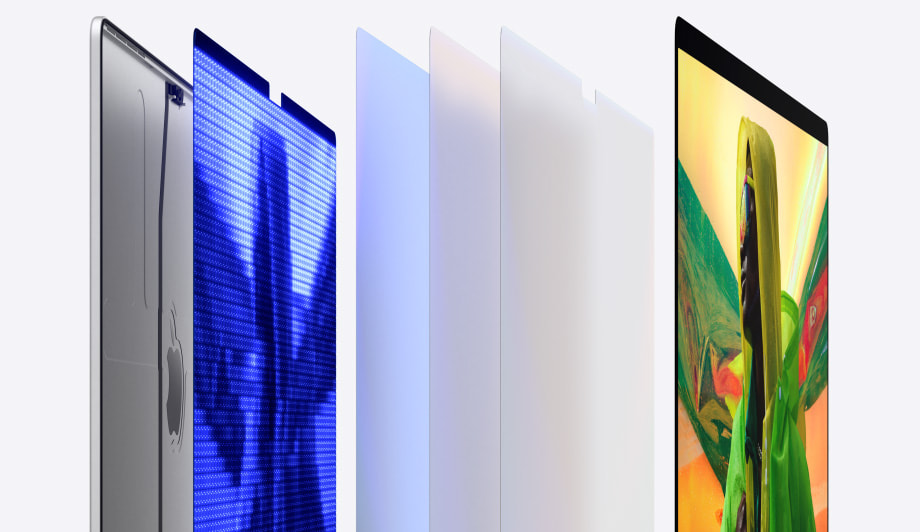

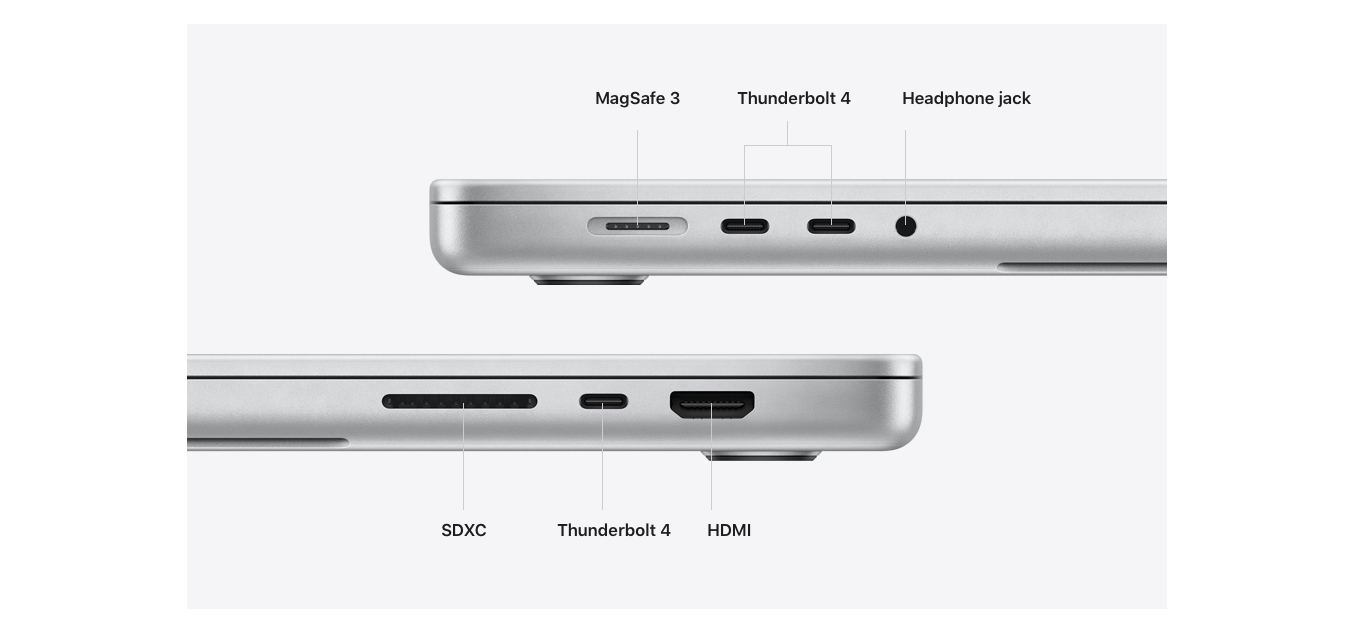

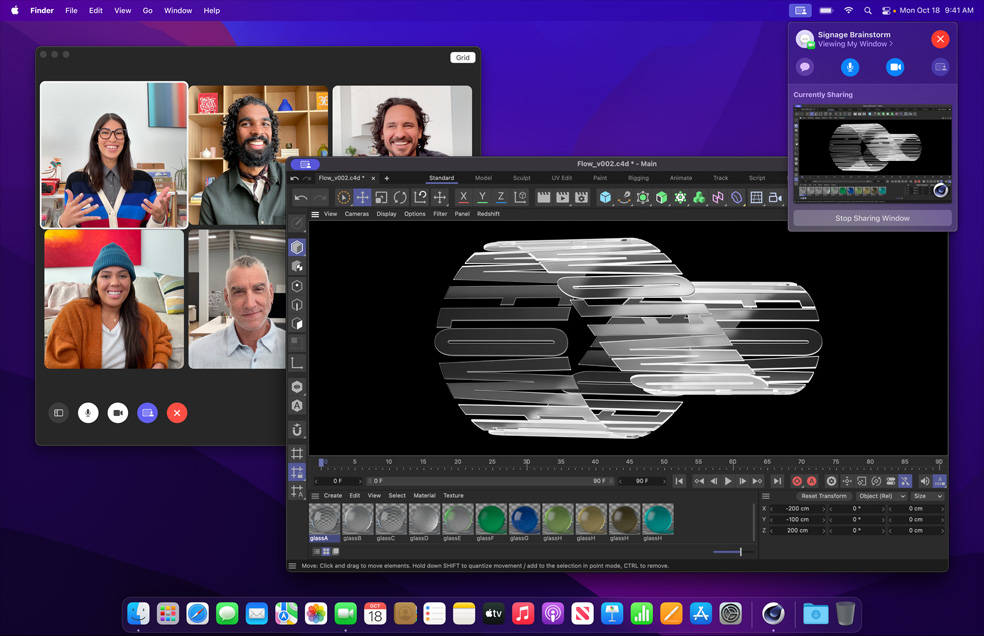


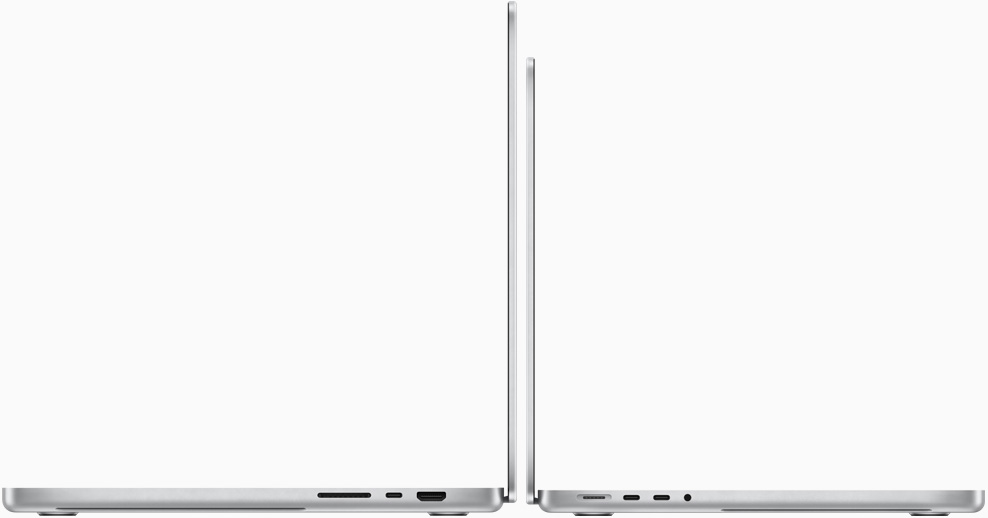 Specification
 Specification



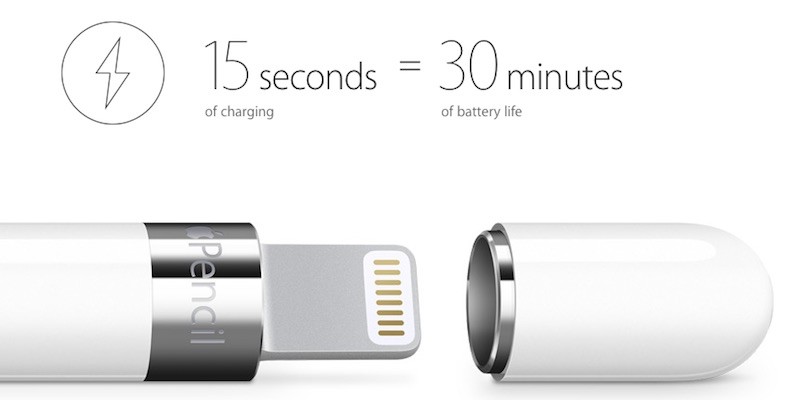


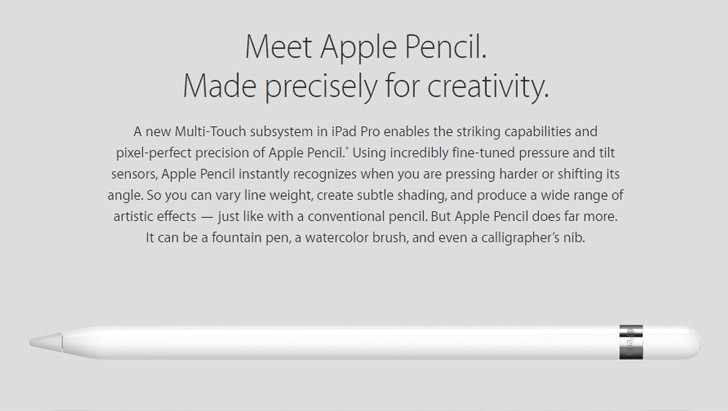

 Apple PencilIntroducing the